
 Need help?
Do you have a question about the VTech Playtime Bus with Phonics and is the answer not in the manual?
Lists included items and provides instructions for unlocking packaging and removing the demo strip.
Step-by-step guide for installing batteries correctly.
Key warnings and recommendations for battery use, mixing, and disposal.
Details on the OFF/Volume Switch, Mode Selector, Character, Number, and Letter buttons.
Operation of the door feature and activation of Horn, Start, and Brake sounds.
Information on moving wheels, flashing headlights, and automatic shut-off.
Descriptions of the Phonics Explore and Number Fun learning modes.
Details on Challenge Time questions and Music Station melody creation.
Lyrics for the three sing-along songs included with the toy.
Instructions for cleaning, storing, and maintaining the unit.
Steps to resolve malfunctions and contact customer service.
Note regarding the product classification as a Class 1 LED product.
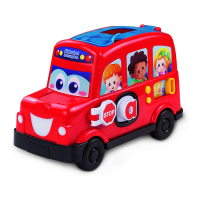
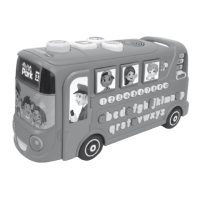
The VTech Playtime Bus with Phonics is an interactive educational toy designed to engage children in learning phonics, letters, vocabulary, numbers, counting, and safety rules through playful interaction. This toy is part of VTech's Pre-School range, aimed at developing imagination and encouraging language development in children aged 3-6 years, though its educational content can also cater to younger children (birth-36 months) for basic sensory and cause-and-effect learning, and older children (4-10 years) for curriculum-related learning.
The Playtime Bus offers a multi-faceted learning experience through various interactive elements and play modes. At its core, the bus features a set of Letter Buttons (a-z) and Number Buttons (1-10) that are central to its educational activities. When pressed, the Letter Buttons teach phonic sounds, letter names, and associated vocabulary, while also producing fun sounds. The Number Buttons introduce numbers and their order, and can also be used to compose music.
The toy includes a Mode Selector slide switch, allowing children to choose between different game modes:
Beyond the core letter and number activities, the bus incorporates several interactive features that simulate a real bus experience:
The toy is designed with an Automatic Shut-Off feature to conserve battery life. If there's no input for several minutes or after approximately 20 minutes of continuous pushing, the bus will power down. It can be reactivated by pressing any button or sliding the Mode Selector.
The VTech Playtime Bus is designed for intuitive and engaging play. The various buttons are clearly labeled and sized for small hands, promoting easy interaction. The sliding OFF/VOLUME CONTROL SWITCH allows parents or children to turn the unit on and select between high and low volume settings, catering to different play environments.
The Rotating Destination Board visually enhances the imaginative play, allowing children to "travel" to different locations. The combination of phonic sounds, letter names, vocabulary, numbers, counting, and safety rules provides a comprehensive early learning curriculum integrated into a fun vehicle theme. The sing-along songs and melodies encourage musical appreciation and participation.
The toy's robust design with Moving Wheels supports both stationary interactive learning and active, mobile play, making it versatile for different play styles. The flashing headlights add an extra layer of sensory engagement, making the learning experience more dynamic and captivating.
Maintaining the VTech Playtime Bus is straightforward to ensure its longevity and proper functioning.
The toy requires 2 "AA" batteries. New alkaline batteries are recommended for maximum performance. When installing, ensure the unit is OFF, locate the battery cover on the bottom, use a screwdriver or coin to open it, install batteries with correct polarity, and then replace the cover securely.
The battery notice provides important guidelines:
If the program or activities stop working or malfunction, a simple reset procedure is recommended:
The VTech Playtime Bus with Phonics is designed to be a durable and engaging educational companion, fostering early learning skills through interactive play and easy maintenance.
 General
| Product Name | VTech Playtime Bus with Phonics |
|---|---|
| Category | Toy |
| Product Type | Educational Toy |
| Power Source | Battery |
| Battery Type | AA |
| Number of Batteries | 2 |
| Recommended Age | 2 to 5 years |
| Features | music |
| Educational Focus | Phonics, Letters, Vocabulary |



 To Next Page