4
4
4
GETTING STARTED
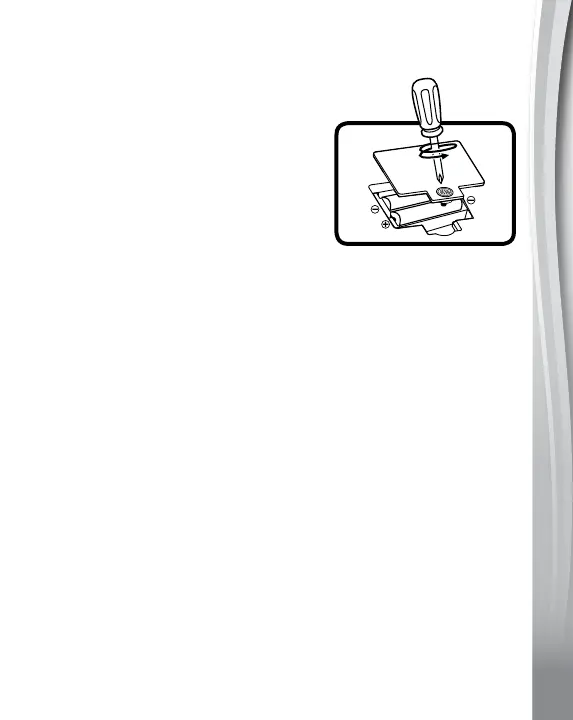
Battery Removal and Installation
1. Make sure the unit is turned Off.
2. Locate the battery cover on the bottom
of the tractor. Use a screwdriver to
loosen the screw and open the battery
cover.
3. Remove old batteries by pulling up on
one end of each battery.
4. Install 2 new AAA (LR03/AM-4)
batteries following the diagram inside
the battery box.
5. Replace the battery cover and tighten the screw to secure.
BATTERY NOTICE
• Usenewalkalinebatteriesformaximumperformance.
• Useonlybatteriesofthesameorequivalenttypeasrecommended.
• Donotmixdifferenttypesofbatteries:alkaline,standard(carbon-
zinc)orrechargeable,ornewandusedbatteries.
• Donotusedamagedbatteries.
• Insertbatterieswiththecorrectpolarity(+and-).
• Donotshort-circuitthebatteryterminals.
• Removeexhaustedbatteriesfromthetoy.
• Removebatteriesduringlongperiodsofnon-use.
• Donotdisposeofbatteriesinfire.
• Donotchargenon-rechargeablebatteries.
• Remove rechargeablebatteries from the toy before charging
(ifremovable).
• Rechargeable batteries are only to be charged under adult
supervision.











 To Next Page