6
NOTE
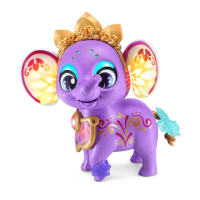
This product is in Try-Me mode in the packaging. After opening the
package, turn Sparklings™ Paige off and on again to proceed with
normal play. If the unit repeatedly powers down while playing, please
install a new set of batteries.
PRODUCT FEATURES
1. Demo/Off/On Selector
To turn the unit On, slide the Demo/Off/On Selector to the On
position. To turn the unit Off, slide the Demo/Off/On Selector to
the Off position.
2. Automatic Shut-Off
To preserve battery life, Paige will automatically shut off after
several seconds without input. The unit can be turned on again
by pressing the Mouth Button or Charm Button.
ACTIVITIES
1. Color Paige
Paige lights up in the colors you choose for her. Press Paige’s
Charm Button to choose a color. Then touch her head, eyes
and ears to add the selected color to them.





 To Next Page