5.Product Operating Instructions
5.1 Power & Function On/Off
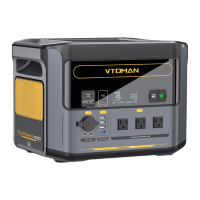
1.Power On: Short press any button to power on the product
and enter the standby state, the LCD Screen will light up and the
battery level indicator icon will display.
2.Power Off: Turn off all outputs manually, then the product
enters the standby state and will shut down after 30 minutes.
3.AC Output On/Off: Short press the AC Button to use the AC
output; Short press the AC Button again to turn if off.
4.DC Output On/Off: Short press the DC Button to use the 12V
DC output; Short press the DC Button again to turn if off.
5.USB-A & USB-C On/Off: Short press the USB Button to use
the USB-A & USB-C output; Short press the USB Button again to
turn if off.
6
V-Beyond Technology: It allows you to run devices over 1500
watts but no more than 3000 watts on FlashSpeed 1500 power
station. It would lower the output voltage to bring the power back
down without tripping the overload protection, so that yo can
continue to run those devices. It's suitable for resistive loads such
as lights, space heaters, toasters, ovens, and coffee makers, etc.
But please note that it's NOT suitable for complex electronics
such as computers, TVs, refrigerators, etc.


 To Next Page