OPERATION WITH THE CONTROL
BUTTONS ON THE VENTILATOR
CASING
REMOTE CONTROL
Operation Instruction for the user and the qualified installer
14
1.Turning the ventilator ON. Setting
operation speed.
Set the speed switch to OFF position
and the ventilation mode switch to
position to enable remote control of
the ventilator.
If Night mode is activated, the
ventilator switches to the first speed
in the night, when the light is turned
off. Activation of the night mode is
confirmed by a long sound signal.
Exiting the night mode is confirmed
by a short sound signal.
2. Turning the ventilator OFF.
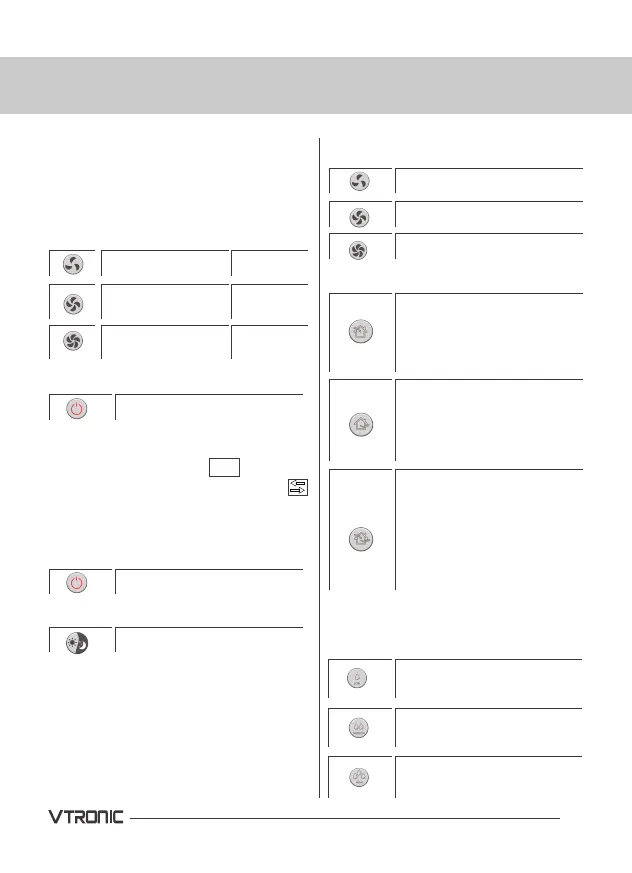
1. Turning ventilator ON/OFF.
2.Night Mode
Press with a beep.
Press with two
beeps.
Press with three
beeps.
Turning the ventilator OFF.
ON/OFF
ON/OFF
Setting humidity threshold
-50%
Setting humidity threshold
-60%
Setting humidity threshold
-70%
3. Speed setting
4. Operation mode
5. Humidity control. Humidity control
is possible only in Regeneration
mode.
Low speed.
Low speed.
Middle
speed.
Middle speed.
High speed.
High speed.
Fresh Air mode. Air is
supplied to the room at a
set speed regardless of
CN7 jumper.
Exhaust mode. Air is
extracted (factory setting)
at a selected speed.
Cycle mode.
The ventilator operates 65
seconds in Supply mode
and then 65 seconds in
Exhaust mode with heat
regeneration.


 To Next Page