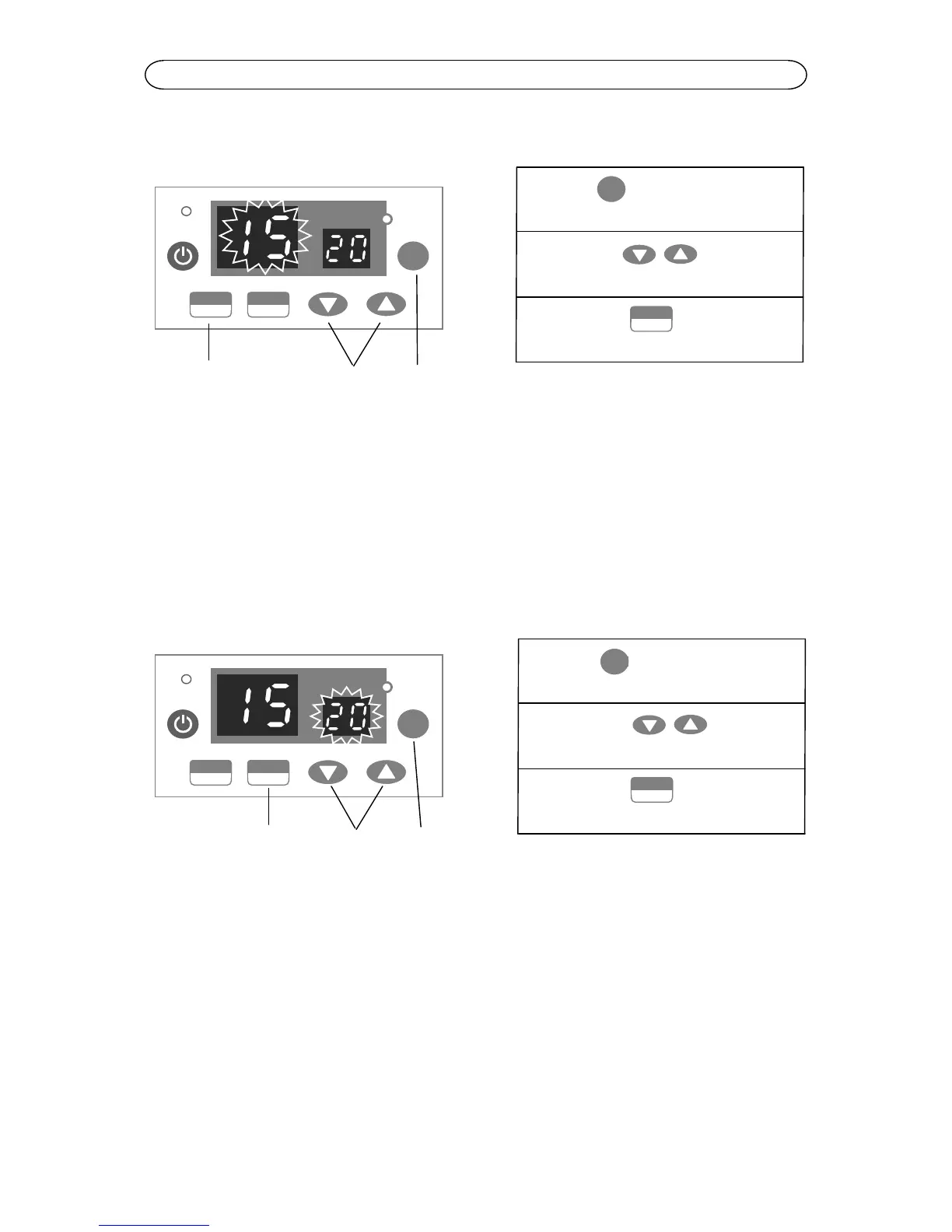
Operating Your Cleaner with Ultrasonic & Heating Feature
STEP:
① Press key till number
on the timing screen flashes
② Press the key to
change timing
③ Press the key to start
ultrasonic
Change Set Temperature
Press MODE key till the number on the Temperature Display flashes (the shown
number at this point is set temperature). Press the Adjust key to change set
temperature and then turn on the HEAT key to start heating. The Heating Indicator
will flash and the number on Temperature Display will show bath temperature
(Temperature Display usually shows bath temperature and shows set temperature
only when adjusting set temperature).
STEP:
① Press key till number on
the temperature display flashes
② Press the key to
change set temperature
③ Press the key to start
heating
When temperature of solution in the bath reaches set temperature, the machine will
stop heating. There will be 2 buzz as notification and the Heating Indicator will be on
but stop flashing. Press the Adjust key for over 2 seconds, the number on
Temperature Display will change rapidly.
Change Set Temperature at Heating Status
When the machine is in heating status, press the MODE key till the number on
Temperature Display flashes. Press the Adjust key to change the number to the
desired temperature (the machine will keep at heating status during the setup
process). After the setup finishes, the machine will run towards the set temperature
automatically without turning on HEAT key again.


 To Next Page