5 | The product at a glance PH20
12 / 33 B-H86.0.11.DB201-1.0
5 The product at a glance
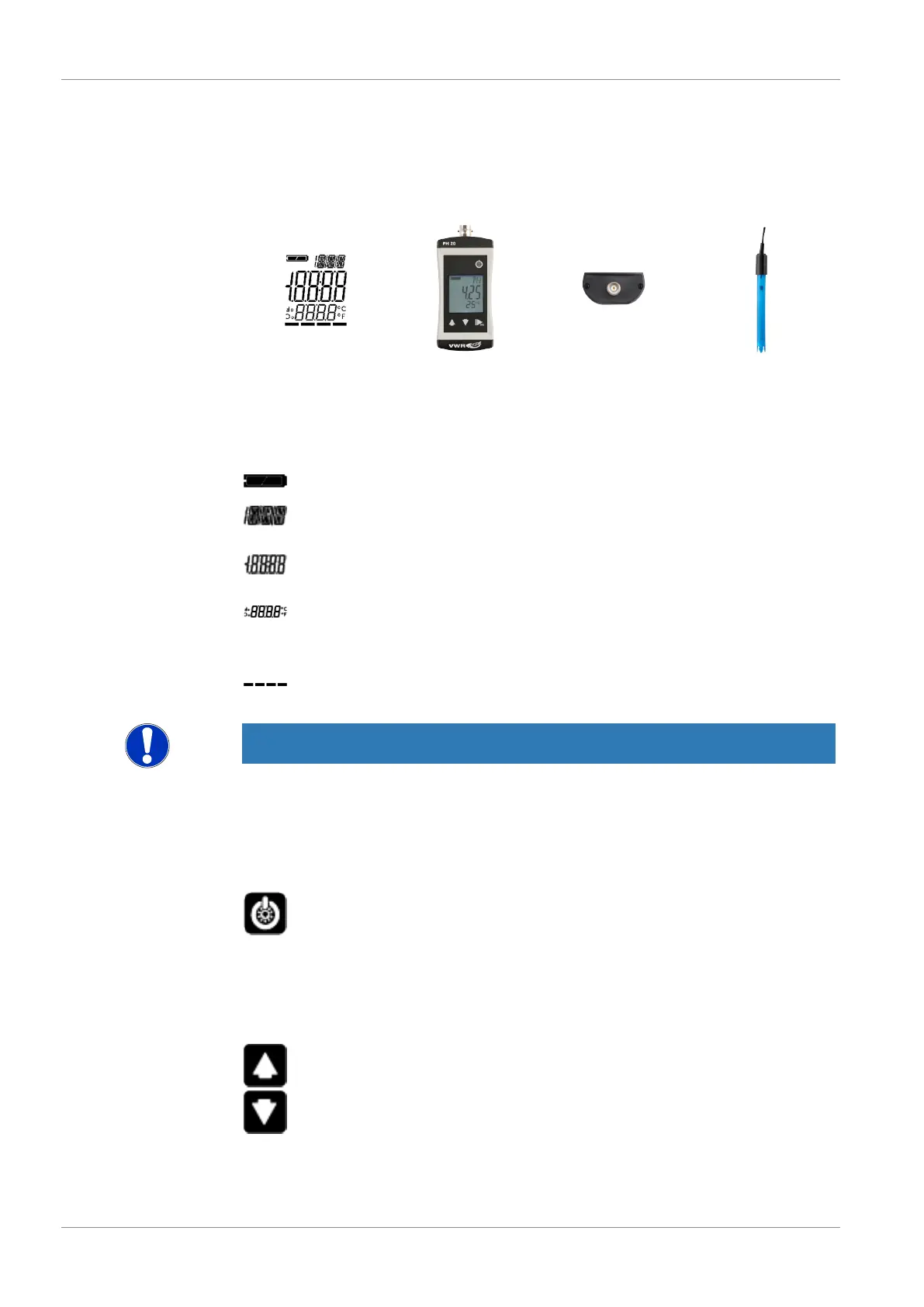
5.1 The PH20
LCD Display PH20 BNC connection 662-1382
5.2 Display elements
Display
Battery indicator Evaluation of the battery status
Unit display Display of units, if applicable, with unstable symbol
or type of mode, min/max/hold
Main display Measurement of the current pH value or value for
min/max/hold
Auxiliary display Corresponding temperature for the displayed pH
value with unit. Measured temperatures are dis-
played with a decimal place, adjusted without.
Bar graph Progress for calibration and visualisation of the
electrode evaluation
NOTE
The unit display shows a rotating circle segment in the first position as long as the
measurement is unstable, if the position is unoccupied by the unit display.
5.3 Operating elements
On / Off button
Press briefly Switch on the product
Activate / deactivate lighting
Long press Switch off the product
Reject changes in a menu
Up / Down button
Press briefly Display of the min/max value
Change value of the selected parameter


 To Next Page