Need help?
Do you have a question about the VWR Traceable Alarm Timer and is the answer not in the manual?
Remove battery compartment insulation before initial use. Timer defaults to clock mode.
Instructions for setting time format, date format, time of day, alarm time, and date.
Guides on setting, activating, using snooze, and deactivating the clock alarm.
Configure alarm silence duration (1 min or continuous) and adjust device volume.
How to toggle between clock and timer modes for viewing.
Steps to set, start, and manage countdown timers with alarms.
Simultaneously set and start countdown timers on all three channels.
Recalling and clearing previously set timer durations.
Instructions for initiating and using count-up (stopwatch) timing.
Setting up timers to count up and count down concurrently.
How to pause and resume timing for individual channels.
Guidance on resolving issues, primarily by replacing the battery.
Procedure for opening the battery compartment and replacing AAA batteries.
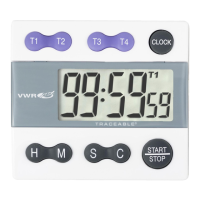
The Traceable® Three-Channel Timer is a versatile timing device designed for precision and ease of use, featuring a clear 1½" x 1¾" high screen with 3/8" LCD digits that display hours, minutes, and seconds. It boasts an accuracy of 0.001% and a resolution of 1 second, making it suitable for applications requiring precise timing.
This timer offers three independent timing channels that can run simultaneously, each with a timing capacity from 1 second up to 99 hours, 59 minutes, and 59 seconds. It supports both countdown timing and count-up (stopwatch) timing. Each channel is equipped with a unique audible and visual alarm to differentiate between timing events. A key feature is the automatic recall of the last programmed time for all three channels, simplifying repetitive tasks. The device also includes a 24-hour format clock function.
To enter timer mode, press the CLOCK button once. Pressing it again toggles back to clock mode. During timing, you can switch between timer and clock views. In clock mode, active timers (1, 2, or 3) will flash on the display.
All three channels can run simultaneously. Follow the steps for setting individual countdown times for each channel. To start all channels simultaneously, press ALL TIME. Each channel has a unique alarm sound: CHANNEL 1 beeps once, CHANNEL 2 twice, and CHANNEL 3 three times. If multiple alarms reach zero, only the alarm for the last channel to reach zero will be heard.
The timer supports various combinations of count-up and count-down across its three channels:
Any running channel can be stopped by pressing its corresponding CHANNEL button (1, 2, or 3). Pressing the button again resumes timing. Multiple timeouts can be taken during any timing event.
The alarm can be set to automatically silence after one minute or to sound continuously until manually silenced. This setting affects both the time-of-day alarm and all three timer channel alarms. To change this, open the BATTERY COMPARTMENT DOOR (slide in direction of arrow). Slide the ALARM DURATION SWITCH to "1 MIN" for a one-minute alarm or to "∞" for continuous alarm. Replace the BATTERY COMPARTMENT DOOR.
The device has two volume settings for key confirmation and alarm sounds. The VOL SWITCH is on the top right-hand corner. Slide VOL up for high volume or down for low volume.
An incorrect display, no display, or operational difficulties indicate that the battery should be replaced. To open the BATTERY COMPARTMENT, slide the door on the back of the unit in the direction of the arrow. Remove the depleted battery and insert one fresh AAA alkaline battery, ensuring correct polarity (+ and -). Replace the BATTERY COMPARTMENT DOOR. The recommended replacement battery is Cat. No. 1105.
If the timer does not function properly, replace the battery with a fresh, high-quality AAA alkaline battery. Low battery power can cause various "apparent" operational difficulties, which a fresh battery will resolve.


 To Next Page
 General