7
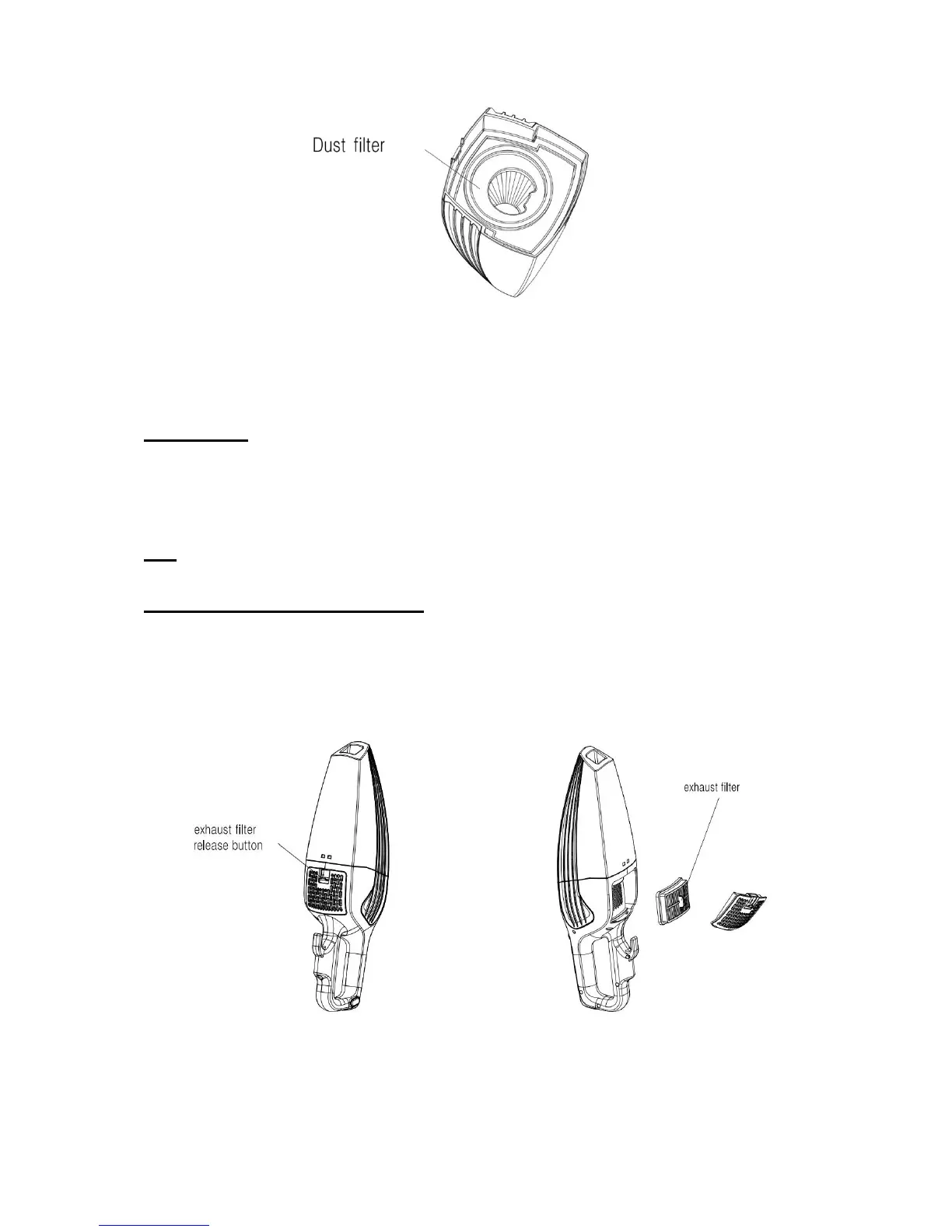
2. Pull out the dust filter. (Fig. 8)
Fig. 8
3. Empty the dust from the dust container.
4. Rinse the filter in cold water, and then let it air dry for 24 hours before replacing it back in the dust container.
Important Note: DO NOT use a washing machine to clean the dust filter. Do not use a hair dryer or heater to
dry it. AIR DRY ONLY.
5. Replace the dust filter carefully into the dust container. NEVER operate the vacuum without the filter in place.
6. Attach the dust container to the main body of the unit.
Note: It is recommended that the dust filter be replaced every three (3 - 6) months (depending on usage) to ensure
peak performance of the unit.
Cleaning and changing the exhaust filter
1. To clean or replace the exhaust filter, press down the release button on exhaust board. (Fig. 9)
2. Take out the exhaust filter. (Fig. 10)
3. Clean or replace the filter.
Fig. 9 Fig. 10


 To Next Page