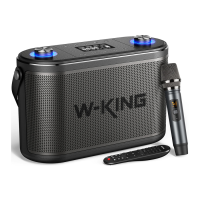
Microphone function (The following situations are all after the
microphone is connected)
Actions
Mic Volume Mode
Music Volume
Operation
Press and hold the "Equalizer" button until you hear ONE
"bee-", then short press "Volume +/-" buttons to adjust
volume.
When you enter mic volume mode , 10 seconds of no
operation will automatically enter the music volume,
then Short press "Volume +/-" buttons to adjust music
volume.
Product Care & Use
Keep away from liquids, extreme heat, and strong magnetic fields.
Do not use this speaker at high volume for extended periods, as this
may cause permanent hearing damage or loss.
Warranty & Customer Support
For questions, support, or warranty claims, contact us at Amazon E-mail:
support.amazon@w-king.com or Walmart E-mail: support.walmart@w-king.com
which corresponds with your region. Please include your Amazon order number
and product model number.
Please note, W-KING can only provide after-sales service for products
purchased directly from our official online store. If you have purchased
from a different seller, please contact them directly for service or
warranty issues.
08


 To Next Page