7
EN
Calibrating the pen display
For optimum performance, you must calibrate the pen display to align the screen cursor with the position of the pen on the
display screen. This is required to compensate for the viewing angle, and to adjust for parallax. Position the pen display at
the angle that you are going to be working from, then follow the procedure below to perform calibration.
You may want to re-calibrate whenever you signifi cantly change your working position or viewing angle.
1 Open the Wacom Tablet control panel.
See page 12 for information on the Wacom Tablet control panel.
2 Click the Calibrate tab.
3 Click Calibrate....
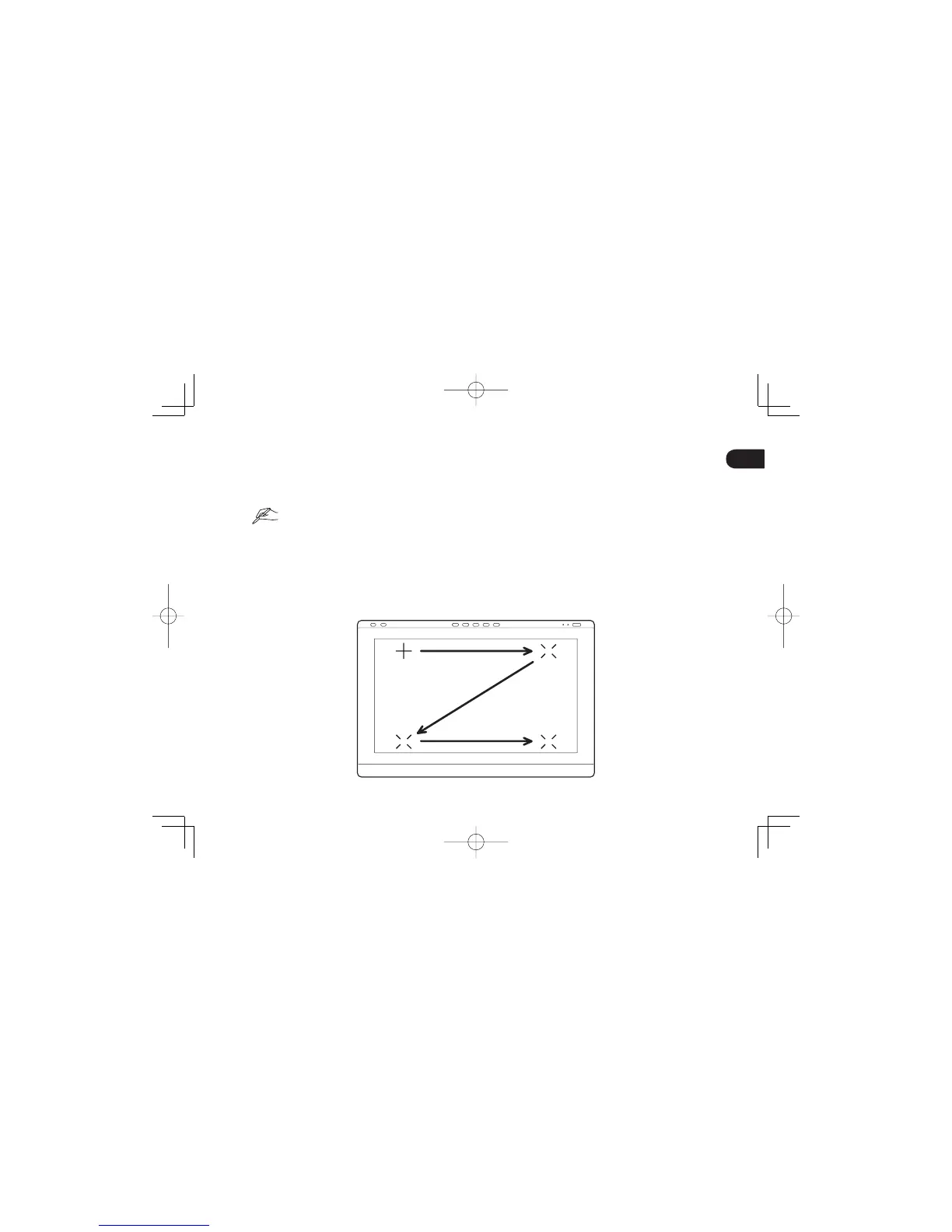
4 Starting at the upper left corner, click the center of each cross mark that appears on the screen with the pen.
The position adjustment is completed when the cross marks disappear.
Click OK and close the control panel after saving the adjustment settings.
•
•
DTH2242DTK2241QSGE.indb7DTH2242DTK2241QSGE.indb7 2012/11/2114:47:182012/11/2114:47:18



 To Next Page