Need help?
Do you have a question about the Wagner Meters Orion 920 and is the answer not in the manual?
Provides a concise guide for initial setup and basic measurement of solid wood.
Outlines essential guidelines for accurate and reliable moisture measurements.
Details the SPECIES/MATERIAL button for selecting measurement modes and species settings.
Guides on how to set the correct species for accurate wood moisture measurement.
Details the AUDIO button for setting moisture alarms and audible alert volume.
Provides step-by-step instructions for recalibrating the Orion® 920 meter.
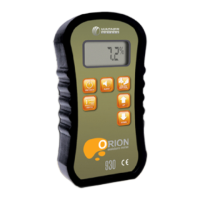
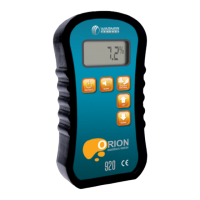
The Wagner Meters Orion® 920 is a highly accurate, hand-held moisture meter designed primarily for measuring moisture content in wood, but also capable of providing relative moisture measurements for non-wood building materials. Utilizing an electromagnetic field, the device reads moisture in the wood, not just on the surface, covering a relatively large cross-sectional area to provide a comprehensive representation of the true moisture content. Its sensor field, measuring 2.0 inches (50mm) wide by 2.5 inches (63mm) long by .25 inches (6mm) thick, closely approximates the full-thickness cross-section method used in the ASTM D4442-16 oven-dry lab method, which is the standard for wood moisture measurement accuracy.
The Orion® 920 is designed for shallow measurement, penetrating from the surface down to .25 inches (6mm), making it ideal for applications like measuring moisture content in solid wood flooring already installed on a subfloor without penetrating through the piece. The meter's technology is virtually unaffected by wood temperature, ensuring consistent and reliable readings.
The Orion® 920 operates in various modes, primarily the Standard Measurement mode for solid wood, where it measures moisture content within a range of 4.0% to 32.0%. The device features an easy-to-read digital display that shows readings in 0.1% increments.
The meter's interface includes several function buttons for intuitive operation:
ON/HOLD Button: This button serves multiple purposes. When the meter is OFF, a brief press and release turns it ON, displaying the model and firmware revision numbers before entering Standard Measurement mode. While in Standard Measurement mode, pressing and releasing this button will "freeze" the current reading on the display, indicated by the word "HOLD" in the upper right-hand corner. This is particularly useful for taking measurements in hard-to-reach areas where the display might not be visible. Pressing it again releases the HOLD function. To turn the meter OFF, the ON/HOLD button must be pressed and held for approximately 2 seconds. The meter also features an auto shut-down function, turning off after 60 seconds of no activity to preserve battery life.
SPECIES/MATERIAL Button: This versatile button allows users to cycle through three different modes:
UP and DOWN Buttons: These arrow buttons are used to adjust settings within the Species Settings mode and the AUDIO settings mode. In Species Settings mode, a single press changes the setting by 0.01. Holding the button down for 0.7 seconds will increment or decrement the setting by 0.10, and subsequent holds will continue to change the setting by 0.10. The settings "wrap around" when the minimum (0.20) or maximum (1.00) is reached.
AUDIO Button: This button allows users to set a high moisture content alarm threshold and adjust the volume of the audible alarm. The alarm threshold can be set from 5% to 32% in 1% increments. A single press of the UP or DOWN arrow buttons adjusts the threshold by 1%. Holding the button down for 0.7 seconds changes the threshold by 5% increments. The volume setting ranges from OFF (disabled) to 9 (loudest), with 1 being the quietest. This feature is useful for quickly scanning wood for higher moisture content areas without constantly looking at the display.
To ensure accurate readings, users should firmly press the sensor plate against the wood surface, ensuring the entire sensing area is covered. Visible moisture should be wiped off, and measurements should be avoided over defects or knots. For optimal accuracy, the meter should be oriented with the direction of the wood grain. The minimum wood dimensions for accurate measurement are 2.0 inches (50mm) wide by 2.5 inches (63mm) long by .25 inches (6mm) thick. When measuring thinner pieces (less than .50 inches), a small air gap (1-inch minimum) underneath the wood is recommended.
Low Battery Alert: When the 9-volt battery is low, "BAT" appears in the upper right-hand corner of the display. If ignored, a larger "BAT" will flash three times before the meter automatically shuts down to prevent inaccurate readings. The battery should be replaced immediately with a non-rechargeable Alkaline or Lithium, or rechargeable NiMH battery, observing proper polarity.
Calibration: The Orion® 920 can be easily recalibrated using the provided On-Demand Calibrator. It is crucial to use the Calibrator that matches the meter's serial number (located in the battery compartment and on the Calibrator itself). The calibration process involves placing the meter on the Calibrator, firmly seating the sensor pad in the recessed area, pressing the AUDIO button three times, and then holding the meter in the air until "DONE" appears on the display.
Protective Rubber Boot: The meter comes with a fitted rubber boot that snugly surrounds its perimeter. This boot helps prevent damage from drops or impacts and should remain in place at all times, even during calibration. All function buttons, the display screen, sensing plate, and battery compartment remain accessible with the boot on.
Meter Storage: When not in use, it is recommended to store the meter in its hard shell carrying case. For storage periods longer than 30 days, the 9-volt battery should be removed.
The Orion® 920 is backed by an industry-best 7-year warranty, reflecting Wagner Meters' commitment to quality and durability. Users are encouraged to register their meter online for faster support and benefits.
 General
| Resolution | 0.1% MC |
|---|---|
| Type | Moisture Meter |
| Display | LCD |
| Calibration | Factory calibrated |
| Specific Gravity Range | 0.30 to 1.00 |
| Reading Depth | 0.75 inches |
| Operating Temperature | 32°F to 120°F |

 To Next Page