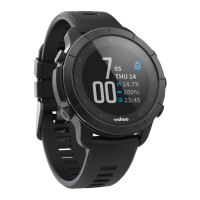
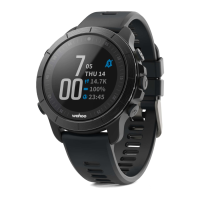
ELEMNT Rival multisport GPS watch
The ELEMNT Rival is a multisport gps heart rate watch offered by Wahoo Fitness, giving you
plenty of functionality plus enabling you to measure your performance with ease.
The ELEMNT Rival is designed to be used in conjunction with the ELEMNT companion app, a
free app which allows you to maximize the potential of the ELEMNT Rival and makes getting the
most out of your workout an easier task.
As a stand alone device, the ELEMNT Rival gathers information on heart rate, temperature,
elevation, location & speed. By connecting additional sensors, the ELEMNT Rival can gather a
wealth of information to expand your reporting ability on your workout.
Use with or without your smartphone when performing a workout and enjoy quick and easy
automated upload of your workouts via Bluetooth.
iOS: This product is designed for use on the iPhone 4s and newer, iPad 3rd gen
and newer, iPad mini, iPad Air, and iPod 5th gen and newer.
Android:
This product is designed for use with Android devices compliant with the
Bluetooth 4.0 protocol running version 4.3 or newer & must allow Third
Party App Access to the Bluetooth 4.0 Radio.
NOTE:
Wahoo Fitness has not tested complete compatibility with all Android devices
matching this description. Please download the app from the Google Play Store to
ensure that it installs on your device before purchasing a product.
This product is shipped with the following:
•
ELEMNT Rival Multisport GPS Watch
•
ELEMNT Rival Charger
•
Quickstart guide
•
Important Product Info Guide
Setting Up:
This setup guide is intended to assist with readying your ELEMNT Rival for first use and
pairing to the ELEMNT companion app.
ELEMNT Rival multisport watch:
1.
Remove from packaging.
2.
Turn on by pressing the power button located on the upper left side of the device.
After first time loading, a QR code will be displayed. You are now ready to start


 To Next Page
 Loading...