EasyManua.ls Logo

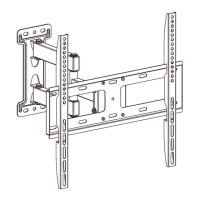
Wali WL-FTM-1 - User Manual

Wali WL-FTM-1
8 pages
Print Icon
To Next Page IconTo Next Page
Loading...
Question and Answer IconNeed help?

Do you have a question about the Wali WL-FTM-1 and is the answer not in the manual?

Summary

UNPACKING INSTRUCTIONS

IMPORTANT SAFETY INFORMATION

Supplied Parts List

Step 1: Mounting the Wall Plate to the Wall

Wood Studs Wall Installation

Instructions for mounting the wall plate to wood studs.

Brick or Concrete Wall Installation

Instructions for mounting the wall plate to brick or concrete walls.

Step 2: Mounting the Monitor Brackets to a TV

Step 3: Attaching TV to Wall Plate and Adding Safety Bolts

Step 4: Level the TV Mount

Step 5: Adjusting the Tilting Angle

Using the Mount in Two Configurations

Part 1 Configuration: VESA 100 x100 mm Mounting

Part 2 Configuration: VESA 400 x400 mm Mounting

Mounting the Wall Plate to Wood Studs

Instructions for Part 2 wall plate installation on wood studs.

Mounting the Wall Plate to Brick or Concrete Wall

Instructions for Part 2 wall plate installation on brick/concrete.

Attaching TV to Wall Plate and Adding Safety Bolts

Instructions for attaching the TV to the wall plate in Part 2.

Wali WL-FTM-1 Specifications

General IconGeneral
Weight Capacity33 lbs
VESA Compatibility75x75mm, 100x100mm
MaterialSteel
ColorBlack
TypeFull Motion
Swivel Range±90°
Tilt+35° ~ -50°
Swivel+90° ~ -90°