8 9
directly on the tripod. You can nd high-quality and matching tripod
heads in many variations in our webshop at www.foto-walser.de/en. For a
professional mounting and the optimal t of tripod heads we recommend
the use of the set screws integrated in the mounting plate (1). First of
all, countersink these grub screws so that they do not protrude over the
mounting plate. Mount the tripod head. Observe the relevant instructions
in the manual for the tripod head. Then tighten the grub screws, which are
accessible from below, with the Allen key included in the scope of delive-
ry. This ensures that the tripod head is held rmly and non-twisting on the
mounting plate. Finally, check that the tripod head is rmly xed.
NOTICE!
Please make sure that the set screws integrated in the mounting plate
are not overtightened. Due to their design, these threaded pins cannot
transmit much force. Furthermore, tightening the set screws too much
can damage the surface of the tripod head.
Instructions for use and care of the tripod
Please observe the instructions regarding the maximum load capacity
of your tripod model. Please note that the indicated values apply to
equipment placed centrally on the tripod/tripod head. Depending on the
equipment used and the leverage that occurs when tilting the load (over
approx. 45 °) on your tripod head, the maximum loads can deviate from
the specied maximum value.
To increase stability, use additional weights that you attach to the load
hook. Tip: This can also be a bag lled with sand. Note that the remaining
load-bearing capacity of the tripod is reduced accordingly.
In general, all elements of this tripod are maintenance-free. However,
regular removal of sand, dust and other impurities is recommended. If you
notice a scratching or crunching noise at the legs of the tripod, please
remove the dirt with a soft, damp cloth. If this does not improve the situ-
ation, you can unscrew the locks and clean the components within. After
cleaning, reassemble the components.
If the tripod leg locks become loose over time, tighten them with the
included hexagon socket wrench.
We recommend that you store the tripod in the bag provided when not in
use or during transport. The bag protects both the tripod and the moun-
ted head from scratches and other damage. The bag is long enough to
accomodate the tripod with a mounted tripod head.
The working conditions of this product are approx. – 30 ° C to 60 ° C. Avoid
high temperatures or direct sunlight over a long period of time.
Scope of delivery
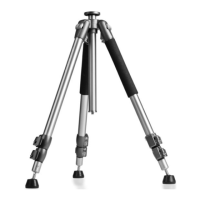
1 x Walimex per FT-665T Pro Tripod, 185 cm
1 x Hexagon socket key set
1 x Transport and storage bag
Technical specications
FT-665T Pro Tripod, 185 cm
Material tripod legs Aluminium
Ø leg segments 32, 28, 24 mm
Type Leg lock Clamping lever
Minimum packing size 72 cm
Max. Load capacity tripod 12 kg
Diameter mounting plate 58 mm
Weight tripod without head 2.27 kg
Number of leg segments 3
Max. working height without head, centre column
extended
185 cm
Max. working height without head, centre column
retracted
160 cm
Min. working height without head, centre column
mounted upright
34 cm
Monopod function No
Centre column reversible Yes
Suitable ball heads, panheads or other accessories can be found in our
web shop www.foto-walser.de/en, e.g.:
21435 Mantona Superior S1-3410AF ball head
The following articles additionally require the adapter 12377 Walimex pro
Adapter 1/4 inch to 3/8 inch
17403 Walimex pro FW-5606H Pro 3D Video Panhead
21459 Mantona Onyx 12 ball head (M1-3612A)



 To Next Page
 Loading...