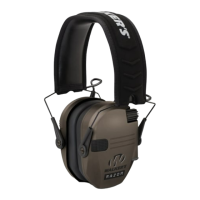
RAZOR XV with Bluetooth® (GWP-NHE-BT)
DEVICE FUNCTIONS
• Turning the device on:
Press and hold the Power button for 2 seconds
The very first time the device is turned on, the Ambient Volume setting is Sound Level 5 (+3dB).
• Changing Ambient Sound Volume:
Volume changes respectively when pressing the Ambient Volume Up or Down controls:
▪ Volume Up increases volume by one stage.
▪ Volume Down decreases volume by one stage.
When Sound Level Changes a single audible beep is produced as an indicator.
• When Ambient Volume reaches minimum Sound Level (Sound level 0 / Mute):
There will be an Audible double beep.
If Volume Down is pressed again at this level, sound level will not change and double beep will be produced again.
• When Ambient Volume reaches maximum Sound Level (Sound level 14 / +14dB):
There will be an Audible double beep.
If Volume Up is pressed again at this level, sound level will not change and double beep will be produced again.
• Changing Listening Modes:
Press both Ambient Volume Up and Down buttons at the same time.
▪ The unit will cycle through the 4 available modes
o Universal
o Clear Voice
o High Frequency Boost
o Power Boost
• Charging the device:
Open the Micro USB Connector cover, plug in a Micro USB cable, then plug the other end into a USB power source or adapter.
While the device is charging the LED will remain constant ON. When fully charged the device’s LED will turn blue.
NOTE: When device is turned off, the ear buds will still provide passive NRR.
BLUETOOTH FUNCTIONS
• Pairing the device:
Press the BT Pairing button to enter Bluetooth pairing mode. When the unit is first turned ON it will search automatically for the last
paired device and then connect, if device is not found it will search for a few minutes and if not paired, Bluetooth will automatically enter
pairing mode.
On the device you want to connect to the headphone, follow the manufacturer’s instructions to locate and connect to “Walker’s Razor
XV BT” (Note: Auto re-connects to previous last connected device during pairing if the BT device has been paired previously).
Once paired, the blue LED will be flashing every few seconds. In Pairing Mode, the light will flash Blue then Red until paired.
• Answer Call:
Short press the BT Pairing button to answer incoming call.
• Reject Call:
Long press the BT Pairing button to reject the call.
• Cancel/end call:
Short press the BT Pairing button to cancel/end call.
• Call on hold/waiting:
During phone calling, if another new call is received, double press the BT Pairing button to switch from first call to second call.
To switch back to first call short press the BT button to end the second call and it will be switched to previous call.
• Last number redial:
Double press the BT Pairing button to re-dial the last phone number.
• Audio Pause/play:
Short press the BT Pairing button to pause/play music.
Skip a song by holding the BT volume up/Down
•

 Need help?
 General

 To Next Page