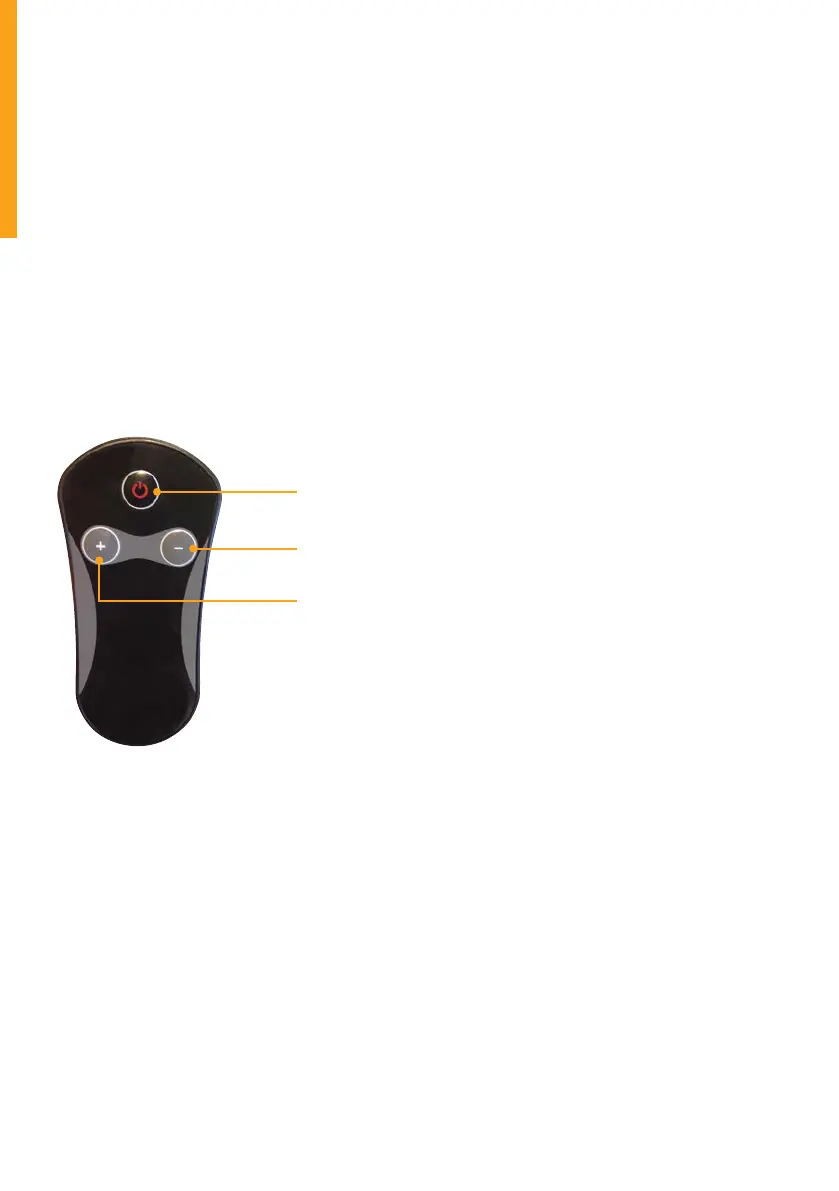
Stopping the Walking Treadmill: Press the start/stop button on the
remote control when you have finished your walking session. The Walking
Treadmill will stop slowly and enter standby mode. Ensure when the
Walking Treadmill comes to a stop that you hold onto the armbar for
support and stability.
Emergency stop
a. The Walking Treadmill has an emergency stop (red security lock).
When in operation, if you feel you need the Walking Treadmill to stop
quickly, simply pull the red safety key. The Walking Treadmill will stop
quickly to ensure your safety.
b. After pulling the security key, to start the Walking Treadmill again,
place the red security key on the yellow area of the security key cover
on the armrest and the machine will enter the standby mode.
Remote control as shown
Display function
1. Step value display – Displays the current amount of steps. Total count
is up to 9999 and it will return to zero.
2. Time / speed display – Displays the current time the Walking Treadmill
has been operating and the speed. The window automatically
switches between the two results.
3. Calorie / distance display – Displays calorie accumulation and
the distance value of the current session of exercise. The window
automatically switches between the two results.
Calorie standard value is 30 calorie / km
Acceleration is 0.1 km / sec, deceleration is 0.1 km / sec
8
Power button
Speed +
Speed –


 To Next Page