Need help?
Do you have a question about the wallhugger s-cape II MR and is the answer not in the manual?
Advisory information in the owners manual must be read carefully before using this product.
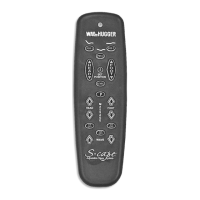
Explains the location and function of each button on the S-cape II MR hand control.
Hand control requires AAA batteries; transmitter conserves power by turning off functions after 50 seconds of continuous button press.
Procedure for programming the hand control by unplugging and replugging the bed's power cord.
Used for lowering the bed to the flat position during a power outage using the learn button.
Press the learn button on the bed receiver unit for 1 second to initiate programming.
Simultaneously press and hold Pos 1 and Head Massage ON/OFF buttons to pair the control.
Program the first hand control to operate one bed by activating the learn button and synchronizing.
Repeat the programming and synchronization process with the second hand control for the same bed.
Program the hand control to operate Bed 1 by activating the learn button and synchronizing.
Repeat the programming and synchronization process to link the hand control to Bed 2.
Initiate programming on Bed 1 and synchronize hand control 1 and hand control 2.
Initiate programming on Bed 2 and synchronize both hand controls to operate Bed 2.
Initiate separation on Bed 1 and synchronize hand control 1 to disconnect it from the bed.
Initiate separation on Bed 2 and synchronize hand control 2 to disconnect it from the bed.
 General
| Type | Remote Control |
|---|---|
| Brand | Wallhugger |
| Model | S-Cape II MR |
| Power Source | Battery |
| Battery Type | AA Batteries |

 To Next Page