ca mp in g a nd o utd oo rs
MULTIMEDIA INPUTS
Page 4
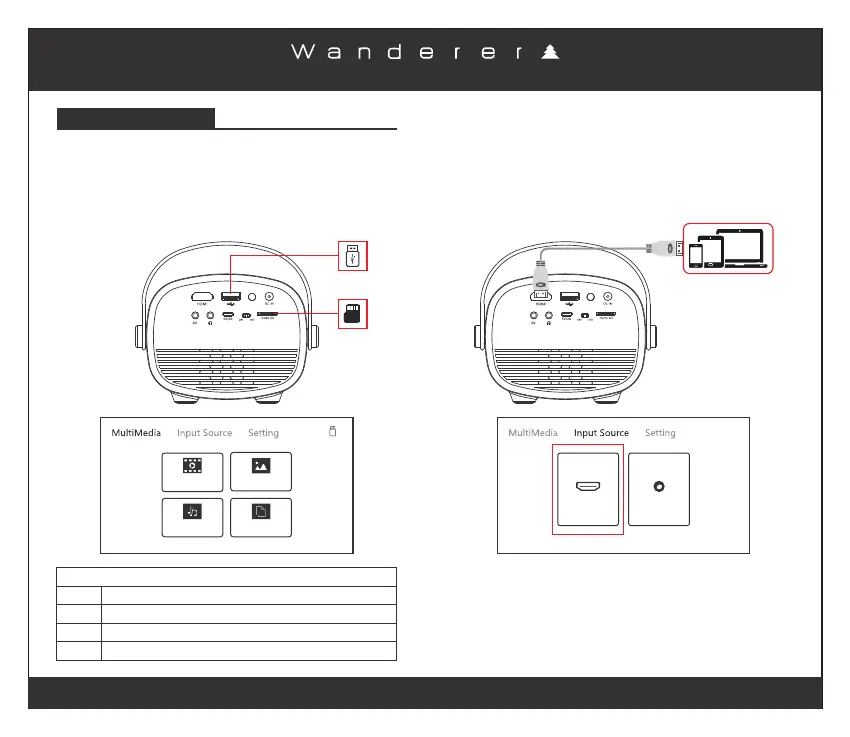
Multimedia Input, connect the USB/Mirco SD Card
containing the content, you wish to view on the projector.
From the main menu select from the type of content you
want to view - “Movie / Photo / Music / Text”.
Select the source to view content.
PhotoMovie
Music
Text
SUPPORTED FILE TYPES
MP3 / WMA / OGG / AAC / FLAC / APE / WAV
JPEG / BMP / PNG
3GP / AVI / MKV / FLV / MOV / MP4 / MPG / VOB / RMVB / RM
TXT
Audio:
Photo:
Video:
Text:
HDMI input connection can be used to connect to laptops,
tablets or mobile phones .(HDMI cable not included)
When connected to a device from the HDMI input select
“Input Source” from the top of the main menu and choose
source HDMI to connect to the device.
HDMI AV
SUPPORTED FILE RESOLUTIONS:
480P, 576P, 720P, 1080P, 1280 x 720, 1280 x 800, 1366 x 768,
1440 x 900,1440 x 960, 1680 x 1050, 1920 x 1080


 To Next Page