ca mp in g a nd o utd oo rs
SETUP MENU
MultiMedia
Input Source
Setting
MultiMedia
Input Source
Setting
Page 6
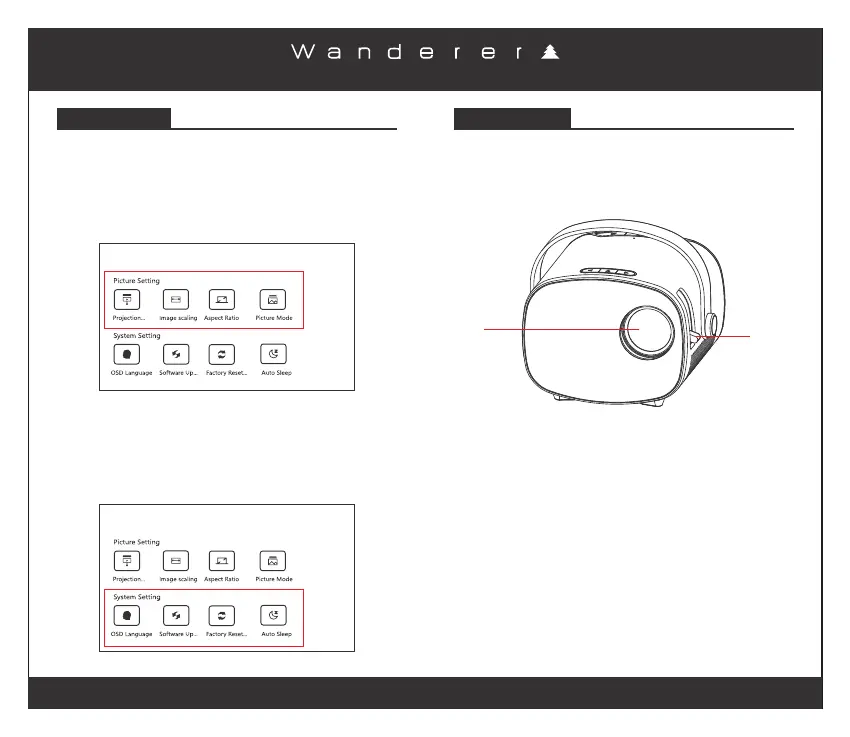
Picture Setting Menu
Keep going back on the remote until you get to the opening
screen. Select “Setting” from the top right of the screen.
Under “Picture Setting” choose Projection Mode / Image
Scaling / Aspect Ratio / Picture Mode to enter their menu
options.
System Setting Menu
Keep going back on the remote until you get to the opening
screen. Select “Setting” from the top right of the screen.
Under “System Setting” choose OSD Language / Software
Update / Factory Reset / Auto Sleep to enter their menu
options.
IMAGE FOCUS
Put the projector vertical to the projector screen or white
wall, adjust the manual focus lever until the image is clear.
For best results focusing, do it while video is playing.
Manual
Focus
Lens


 To Next Page