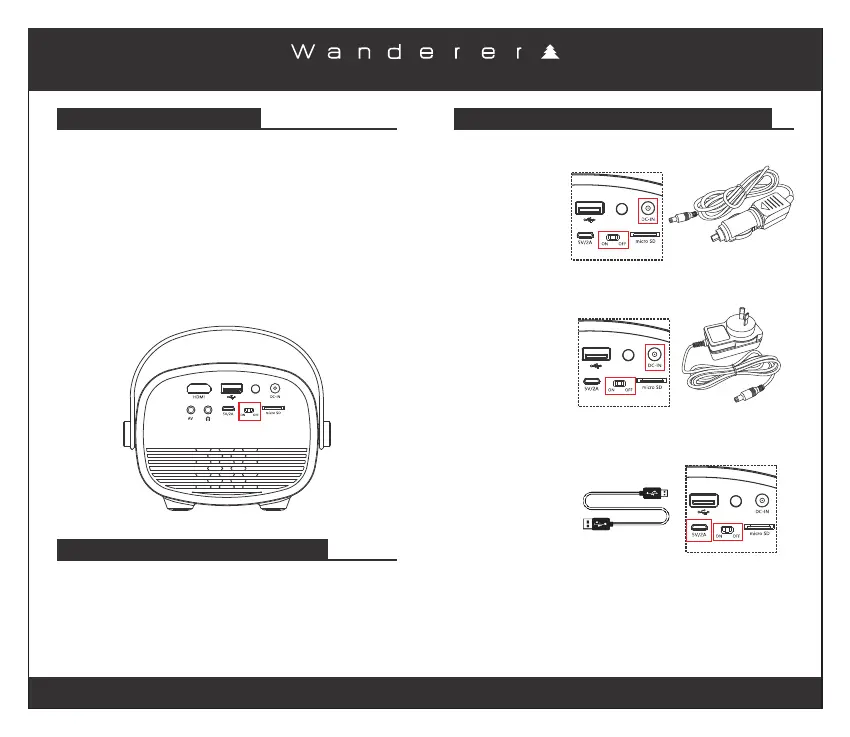
BUILT-IN LITHIUM BATTERY RECHARGING THE BUILT-IN LITHIUM BATTERY
ca mp in g a nd o utd oo rs
Page 7
When not in use, ensure that the built-in Lithium battery is
recharged at least every 2 months.
Charging Time: Approximately 3.0 Hours
When the built-in Lithium battery is fully charged you can
enjoy cordless viewing for up to 110 minutes. To operate
directly from the built-in Lithium battery, slide the “Battery
Power Switch” to the “ON” position.
OPTION 1
Using the 12V DC
plug included.
Ensure the “Battery
Power Switch” is
moved to the “OFF”
position while
charging.
OPTION 2
Using the 240V DC
adaptor included.
Ensure the “Battery
Power Switch” is
moved to the “OFF”
position while
charging.
OPTION 3
Using a micro USB
cable (not included).
Ensure the “Battery
Power Switch” is
moved to the “OFF”
position while
charging.
TURN OFF BATTERY WHEN NOT IN USE
When not using the projector please slide the “Battery
Power Switch” to the “OFF” position to ensure the battery
doesn’t drain.
When using the , the projector LEDbuilt-in Lithium battery
brightness dims to conserve power.
When the battery is too low a warning will appear on the
screen “Battery too low”. Please plug in the supplied 240V
AC adaptor or the 12V DC plug to charge the battery
immediately, you can continue to use the projector while
charging the battery.
240V AC Adaptor
12V DC Plug



 To Next Page