2018148_a•en•2017-04-01We reserve the right to make technical changes
2
Operating elements and displays
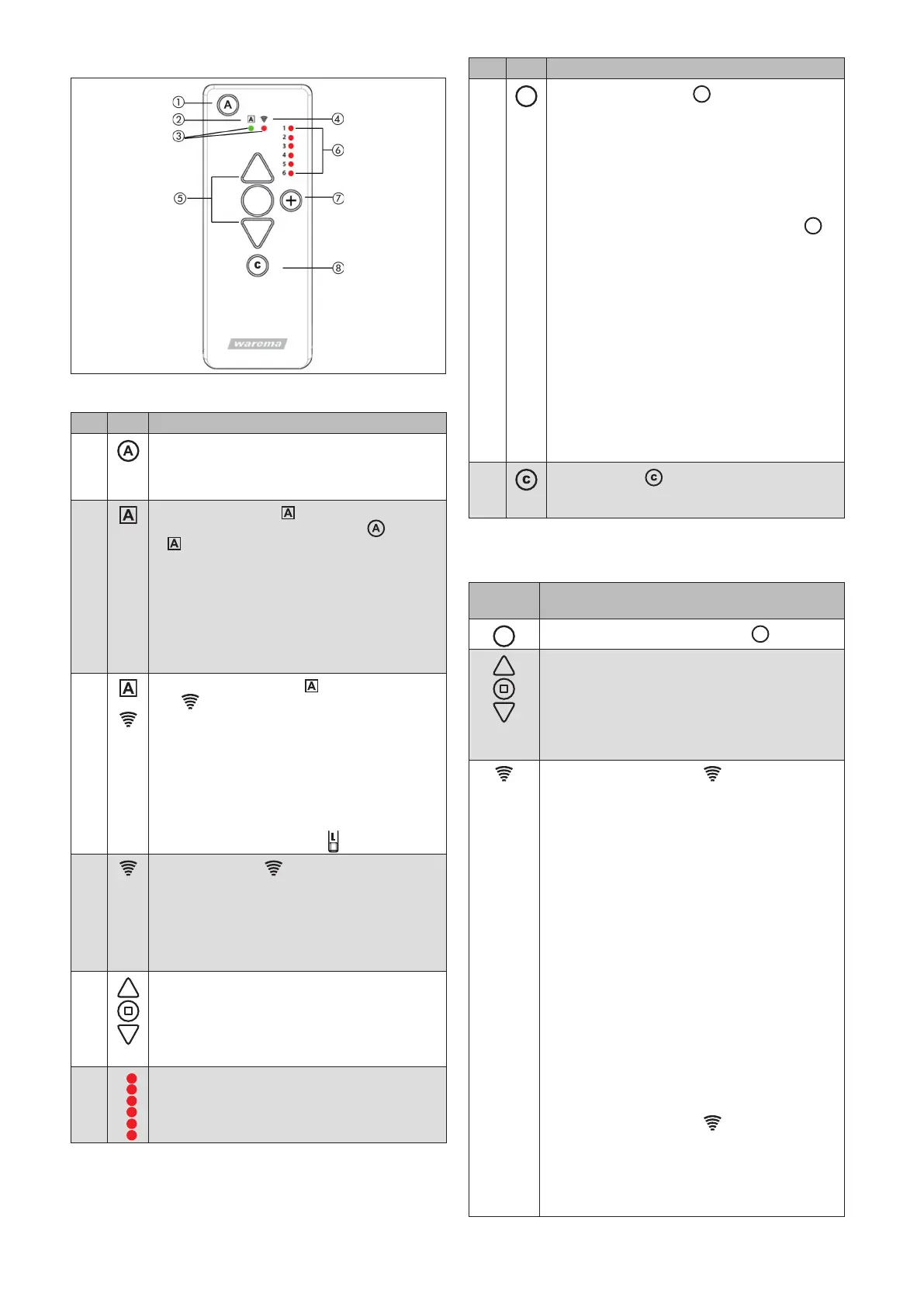
Fig. 3 Operating panel of the WMS Hand-held transmitter plus
Pos. Fig. Function WMS Hand-held transmitter plus
Control function on/off button
Switch on and off the comfort control functions of
the receivers that were learned in for the currently
selected channel.
②
Control function LED with two functions
When you press the control button , the LED
indicates whether the comfort control func-
tions are active or inactive.
If operation is blocked on your WMS Hand-held
transmitter plus, for example due to a wind
alarm, this LED flashes red. (The wind alarm
keeps your sun shading products safe. When
the set wind speed limit is exceeded, the blinds
are retracted and manual operation is blocked
during this time.)
③
+
The control function LED and transmission
LED flash
ORANGE: WMS Hand-held transmitter plus is in
its factory state (does not belong to a network, still
needs to be learned in).
OTICEN If the two buttons flash red, you
pressed the button for too long
and you are now in the factory
mode. To leave this mode, press
the learn button
briefly.
④
Transmission LED flashes
GREEN: The WMS Hand-held transmitter plus is
transmitting.
RED: The WMS Hand-held transmitter plus
has not received a response from the
receiver.
ORANGE: Change the batteries.
UP/STOP/DOWN buttons
Send move or switch commands to the selected
receiver.
If the WMS Hand-held transmitter plus is in the info
or learn mode, the buttons can be used to change
or save settings.
2
3
4
5
LED display channel 1 to 6
The selected channel lights up red.
Pos. Fig. Function WMS Hand-held transmitter plus
Channel change button
A brief press of the button switches between
channels 1 to 6.
OTICEN Should there be channels that are
not assigned, the display skips
over them to the next assigned
channel (e.g. from channel 1 to
channel3). If you have just as-
signed channel 2, press the
button for 5s. A brief press of the
button then selects the desired
channel (channel LED flashes).
In this mode, you can then assign the
previously empty channel by pressing the L
button within 8 s and launching the learning/
copying process. The mode is closed auto-
matically after 8 s (channel LED no longer
flashes and is only lit).
OTICEN The exception is factory mode:
here, the WMS Hand-held trans-
mitter plus remains in expanded
selection mode, even if the start
channel is selected again.
Comfort button
This button can be used to save and call up com-
fort positions.
Operation
Operating the products
Button/
display
Action/result
WMS Hand-held transmitter plus
Select the channel using the
button.
Operate the selected product using the
UP/STOP/DOWN buttons.
The operating instructions of the respective
receiver describe which operating options are
available to you (e.g. UP=ON, DOWN=OFF,
STOP=switch).
The transmission LED
indicates that
transmission is occurring:
Flashes GREEN:
The WMS Hand-held transmitter plus is
transmitting, then:
Lights up GREEN for 2 s:
The receiver has confirmed the command.
Lights up RED for 2 s:
The command has not been confirmed (e.g.
receiver is outside of the transmission range),
or
the WMS Hand-held transmitter plus was
added to the network but a channel has not
yet been copied onto the WMS Hand-held
transmitter plus.
Lights up GREEN for 2 s +
control function LED red:
The receiver confirms the command, but does
not execute it because of a superordinate con-
trol function (e.g. the awning is not extended
because the wind alarm is active).
The transmission LED
indicates that
transmission is occurring:
Lights up RED for 2 s:
The WMS Hand-held transmitter plus was
added to the network but no receiver has yet
been assigned.


 To Next Page
 Loading...