5
WINE CHILLER/WARMER OPERATION
Using the Wine Chiller/Warmer
1. Insert one end of the power adapter into the Wine
Chiller/Warmer (make sure adapter is securely in
place) and plug the other end into an electrical outlet.
2. Insert wine or champagne bottle into the left or right
side aluminum reservoir.
3. Raise the plastic sleeve to cover the bottle.
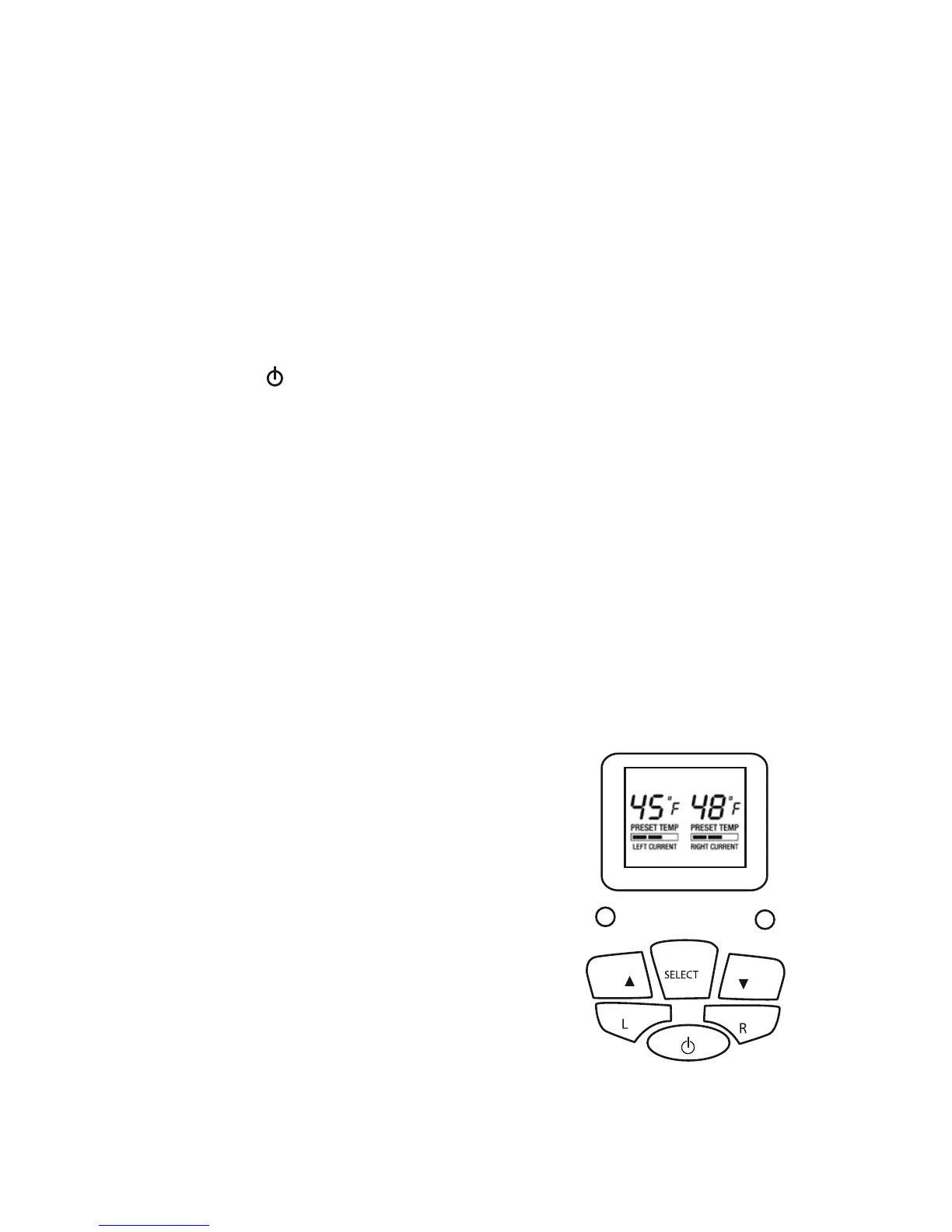
4. Press On/Off until the display illuminates blue.
5. Press L or R for left or right chilling/warming
chamber.
6. Press SELECT to enter the Wine Library.
7. Press Up/Down keys to select red wine, white wine
or Champagne.
8. Press SELECT again, then press s or ▼ to select your
specific wine or Champagne.
9. Press SELECT again and cooling or warming
begins. The LCD indicator display is set up to show
the left and right side preset temperatures and status
(using the bar graph).
10. When cooling/warming process
has been completed, LCD will
display CHEERS ! and a full
bar graph.
11. After the cooling/warming
process has been completed,
the unit will cycle off for
approximately 3 minutes and
then will automatically resume
the cooling/warming process
to maintain the preset tempera-
ture. See conditions below.



 To Next Page