Setup & Operation
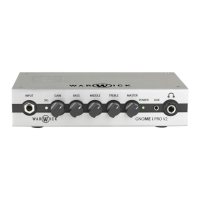
To use your new Warwick Gnome amplier, follow the quick start instructions:
1. Unpacking: Unpack the amplier carefully from the box.
2. Powering up: Ensure the Power Switch is in ‘o’ position, then connect the supplied power cord from the AC Mains In of the amplier to
the mains power outlet. Now ip the power switch on the amplier to the ‘on’ position.
3. Connecting speaker cabinets: Connect speaker cabinet(s) to the Speaker Out using a compatible speaker cable. The recommended
minimum load for the amplier is 4 ohms.
4. Connecting an instrument: Turn the Gain and Master controls to minimum, then connect your bass to the Input Jack on the front pan
5. Adjust Gain for a good input level, set the EQ controls as you like, adjust the Master volume to a reasonable level.
6. Start playing!
USB Interface (Gnome i, Gnome i Pro V2 and Gnome i Pro 600)
The Warwick Gnome i, Gnome i Pro V2 and Gnome i Pro 600 ampliers feature an USB audio interface that can be used as universal connection
device for PC, MAC or compatible mobile devices without any specic drivers or software requirements. The interface uses high quality ADC/
DAC converters to convert your audio signal to be processed with the many applications available or for direct recording in your DAW. Gnome i,
Gnome i Pro V2 and Gnome i Pro 600 are functioning as external soundcards for your mobile device or PC/Mac, converting your instrument's
signal into a digital audio signal. The interface section is compatible with any USB device that can manage digital audio signals, via a standard
USB-B to USB-A cable.
Setup a Windows 7 / 8 / 8.1 / 10 Device
1. Use an USB-B to USB-A cable to connect the amplier to your computer.
2. Your computer will recognize the interface automatically and set all parameters accordingly. If you have problems with the automatic
setup, open the sound settings (right-click on the Windows Start button > Control Panel > Sound).
3. Click the Playback tab and select USB AUDIO CODEC as the default device.
4. Click the Recording tab and select USB AUDIO CODEC as the default device.
5. Open Input Properties > Additional Properties.
6. In the new window, click the Advanced tab and select 2-channel, 16-bit, 44100 Hz (CD Quality) as the default format.
7. Uncheck both boxes under Exclusive Mode.
8. Click OK to close the Sound control panel.
Setup a Mac OS X Device
1. Use an USB-B to USB-A cable to connect the amplier to your computer.
2. Your computer will recognize the interface automatically and set all parameters accordingly. If you have problems with the automatic
setup, go to System Preferences > Sound.
3. Under the Output tab, select USB AUDIO CODEC as your default device.
4. Under the Input tab, select USB AUDIO CODEC as your default device.
5. Close the window.
Protective Circuits
Your new Warwick Gnome amplier comes with multiple protective circuits to prevent malfunctions under unsuitable operating conditions.
Over-Current / Short-Circuit Protection
The amplier features an over-current / short-circuit protected output. A current drop occurs when the amplier exceeds the specied peak current
output. This goes along with the drop in the voltage of the amplier. If the current output of the amplier exceeds its specied peak current output for
a longer period of time e.g. in case of a short circuit of the output, the amplier will be disabled (muted) for 1000 ms and automatically restart.
DC Output Protection
A built-in DC protection circuit will attenuate any DC signals on the power amplier input, produced by a signal containing a DC signal. In case of
a permanent DC on the output of the amplier, the amplier will latch and power must be removed for the product to restart.
Excessive Temperature
This circuit protects the power stage from malfunction by switching the device o if the temperature-regulated fan cooling proves to be insucient
and temperature of the unit is too high.
Warwick Amplification Gnome Series - Bass Amplifier Heads
Gnome · Gnome i · Gnome i Pro V2 · Gnome i Pro 600


 To Next Page
 Loading...