EasyManua.ls Logo

Warwick Gnome Series - User Manual

Warwick Gnome Series
6 pages
Print Icon
To Next Page IconTo Next Page
Loading...
3
Manual for Warwick Amplification Gnome Series
Bass Amplifier Heads
Gnome / Gnome-i / Gnome-i Pro
Introduction
Thank you for purchasing a Warwick Gnome amplifier - clear, defined bass sound, true power and a
built-in USB audio interface on the Gnome-i and Gnome-i Pro models - all packed in a super compact,
lightweight design that will easily fit in your pocket! The Gnome amp heads were developed to offer
transparent, crisp and noise-free performance combined with an ultra-portable, lightweight design in
an affordable and reliable amp for discerning musicians and for the seasoned professionals.
The Warwick Gnome-i and Gnome-i Pro offer an easy-to-use audio interface without any special driver or
software requirements. The USB audio interface allows you to connect your Gnome amp to a PC, MAC or
compatible mobile device to record your playing or to process your signal using digital audio software plug-ins.
Precautions / Safety Instructions
Power Supply
The Warwick Gnome is powered by an IEC power cable, which provides AC power to the unit. Connect the IEC
power cable to provide power. Improper line voltage can cause serious damage to the unit, always check the line
voltage marking on the amplifier before you connect the IEC power cable. Unplug the unit when not in use or
during electrical storms.
Connections
Always turn off power to all other equipment before connecting or disconnecting. This will help to prevent
malfunction and damage to any of the devices used.
Cleaning
Clean only with a soft, dry cloth.
Handling
Do not apply excessive force to the switches or controls. Do not block any ventilation openings. Install in
accordance to the instructions. Do not let paper, metal, dirt or other objects come into contact with the device
or its connections. Take care not to drop the device and do not subject it to shock or excessive pressure. The unit
should be connected to a mains socket outlet with a protective earthing connection. Replace fuse with rated
value, never bridge defective fuses. Before changing fuse disconnect power cable from unit! To avoid
deformation, discoloration, or other serious damage, do not expose this unit to any of the following conditions:
Direct sunlight
Strong magnetic fields
Excessively dusty or dirty environments
Strong vibration or shock
Heat sources
Extreme temperature
High humidity or moisture
Question and Answer IconNeed help?

Do you have a question about the Warwick Gnome Series and is the answer not in the manual?

Summary

Precautions and Safety Instructions

Power Supply Safety

Details the proper connection and voltage checks for the unit's power supply to prevent damage.

Connection Safety Precautions

Advises turning off power before connecting or disconnecting equipment to prevent malfunction.

Handling and Environmental Precautions

Lists precautions against physical damage, environmental conditions, and proper fuse replacement.

Risk of Electric Shock Warning

Warns against opening the unit and advises only qualified personnel for servicing.

Volume and Hearing Safety

Alerts users to potential hearing damage from high sound pressure levels and recommends ear protection.

Front Panel Control Description

Back Panel Connections and Features

Setup and Operation Guide

Protective Circuits

Over-Current; Short-Circuit Protection

Describes the amplifier's protection against excessive current and short circuits.

DC Output Protection

Explains the circuit that attenuates DC signals and prevents amplifier latching.

Excessive Temperature Protection

Details the thermal protection that switches off the unit if it overheats.

Overview

The Warwick Amplification Gnome Series Bass Amplifier Heads, including the Gnome, Gnome-i, and Gnome-i Pro models, are designed to provide a clear, defined bass sound in a super compact, lightweight package. These amplifier heads are built for both discerning musicians and seasoned professionals, offering transparent, crisp, and noise-free performance. The Gnome-i and Gnome-i Pro models further enhance functionality with a built-in USB audio interface, allowing for easy recording and signal processing.

Function Description

The core function of the Warwick Gnome series is to amplify bass guitar signals. These are solid-state, class D amplifier heads, ensuring efficient power delivery and a lightweight design. The Gnome and Gnome-i models deliver 200 W at 4 ohms and 130 W at 8 ohms, while the Gnome-i Pro offers increased power at 280 W at 4 ohms and 180 W at 8 ohms.

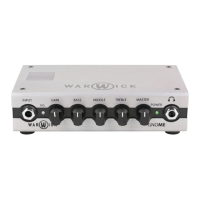
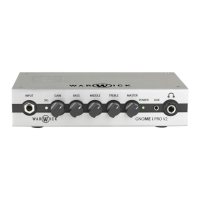
The front panel features an Input Jack (6.35 mm / 1/4") for connecting active or passive basses, or the output from the last unit in an effects pedal chain. A Signal LED indicates the presence of an instrument signal, lighting green for uncompressed signal and red when the built-in compressor/limiter is active, preventing clipping in the pre-amp stage. The Gain control adjusts the input gain of the pre-amp, and when set to maximum, engages a musical distortion circuit. A 3-Band EQ section provides active tone control with +/- 15 dB cut or boost for each band (Bass at 80 Hz, Middle at 400 Hz, Treble at 4.2 kHz), allowing for precise tonal shaping. The Master volume control sets the signal level for the power output stage and speaker output, with a built-in limiter to prevent power amplifier clipping. A Power LED indicates when the unit is powered on. For silent practice, a 6.35 mm (1/4") Headphone Jack is included, allowing users to connect headphones without needing a connected speaker load.

The rear panel offers essential connectivity. An AC Mains In socket (IEC) provides AC power to the unit. A Power Switch turns the amplifier on and off. The Speaker Out accepts 6.35 mm (1/4") mono jacks for connecting an external speaker cabinet, with a minimum load of 4 ohms. An XLR DI Out provides a low impedance balanced output for connecting to a stage box, mixing desk, or PA system for live and studio use. This output is configured post-EQ with standard wiring (Pin 1: Ground, Pin 2: Signal +, Pin 3: Signal -). A Ground Lift switch disconnects the ground connection from pin 1 on the DI output XLR socket, useful for eliminating hum caused by ground loops. The Gnome-i and Gnome-i Pro models also include a USB Out Port (Type B) for connecting to a PC, MAC, or compatible mobile devices, enabling the use of the built-in audio interface.

The USB audio interface on the Gnome-i and Gnome-i Pro models functions as an external soundcard, converting the instrument's signal into a digital audio signal for recording or processing with digital audio software plug-ins. It also converts digital audio signals back to analog for playback through the amplifier's speaker output. This interface is driverless and compatible with any USB device that manages digital audio signals.

Usage Features

The Warwick Gnome series is designed for ease of use and portability. Its ultra-portable, lightweight design means it can easily fit in a pocket, making it convenient for musicians on the go.

To set up and operate the amplifier:

  1. Unpacking: Carefully remove the amplifier from its box.
  2. Powering up: Ensure the Power Switch is in the 'off' position. Connect the supplied IEC power cord from the AC Mains In to a mains power outlet. Then, flip the power switch to the 'on' position. Always verify the line voltage marking on the amplifier matches the local supply to prevent damage.
  3. Connecting speaker cabinets: Connect compatible speaker cabinet(s) to the Speaker Out using a speaker cable. The minimum recommended load is 4 ohms.
  4. Connecting an instrument: Turn the Gain and Master controls to minimum. Connect your bass to the Input Jack on the front panel.
  5. Adjusting levels: Adjust the Gain for a good input level, set the EQ controls to your preference, and slowly increase the Master volume to a desired level.
  6. Start playing!

For models with the USB interface (Gnome-i and Gnome-i Pro):

  • Windows Setup (8/8.1/10): Connect the amplifier to your computer using a USB-B to USB-A cable. The computer should automatically recognize the interface. If not, access Sound settings (right-click Windows Start button > Control Panel > Sound). Under the Playback tab, select "USB AUDIO CODEC" as the default device. Do the same under the Recording tab. In Input Properties > Additional Properties, go to the Advanced tab and select "2-channel, 16-bit, 44100 Hz (CD Quality)" as the default format. Uncheck both boxes under Exclusive Mode and click OK.
  • Mac OS X Setup: Connect the amplifier to your computer using a USB-B to USB-A cable. The computer should automatically recognize the interface. If not, go to System Preferences > Sound. Under the Output tab, select "USB AUDIO CODEC" as your default device. Do the same under the Input tab. Close the window.

The amplifier is capable of producing high sound pressure levels. Ear protection is recommended during prolonged use at high volumes to prevent permanent hearing damage.

Maintenance Features

The Warwick Gnome series incorporates multiple protective circuits to ensure reliable operation and prevent malfunctions under unsuitable conditions.

  • Over-Current / Short-Circuit Protection: The output is protected against over-current and short-circuits. If the current output exceeds its specified peak for too long (e.g., due to a short circuit), the amplifier will be disabled (muted) for 1000 ms and then automatically restart.
  • DC Output Protection: A built-in DC protection circuit attenuates DC signals on the power amplifier input. If a permanent DC is detected on the output, the amplifier will latch, and power must be removed to restart the unit.
  • Excessive Temperature Protection: This circuit protects the power stage by switching the device off if the temperature-regulated fan cooling is insufficient and the unit's temperature becomes too high.

General Maintenance and Safety:

  • Power Supply: Always check the line voltage marking on the amplifier before connecting the IEC power cable. Unplug the unit when not in use or during electrical storms.
  • Connections: Always turn off power to all other equipment before connecting or disconnecting to prevent damage.
  • Cleaning: Clean the unit only with a soft, dry cloth.
  • Handling: Avoid applying excessive force to switches or controls. Do not block ventilation openings. Install according to instructions. Prevent paper, metal, dirt, or other objects from contacting the device or its connections. Avoid dropping the device or subjecting it to shock or excessive pressure.
  • Earthing: The unit should be connected to a mains socket outlet with a protective earthing connection.
  • Fuses: Replace fuses only with the rated value; never bridge defective fuses. Disconnect the power cable from the unit before changing a fuse.
  • Environmental Conditions: To avoid deformation, discoloration, or other serious damage, do not expose the unit to direct sunlight, strong magnetic fields, excessively dusty or dirty environments, strong vibration or shock, heat sources, extreme temperature, or high humidity or moisture.
  • Servicing: The Warwick Gnome has no user-serviceable parts inside. To reduce the risk of fire or electric shock, do not remove screws or open the unit. Only qualified service personnel should perform servicing. Do not expose the units to rain or moisture.

Warwick Gnome Series Specifications

General IconGeneral
TypeBass Amplifier Head
TechnologyClass D
EQ3-band EQ
Inputs1 x 1/4" Instrument
Outputs1 x XLR Direct Out, 1 x 1/4" Speaker Out
Dimensions170 x 108 x 45 mm
ControlsBass, Mid, Treble
Additional FeaturesHeadphone Output

Related product manuals