EasyManua.ls Logo

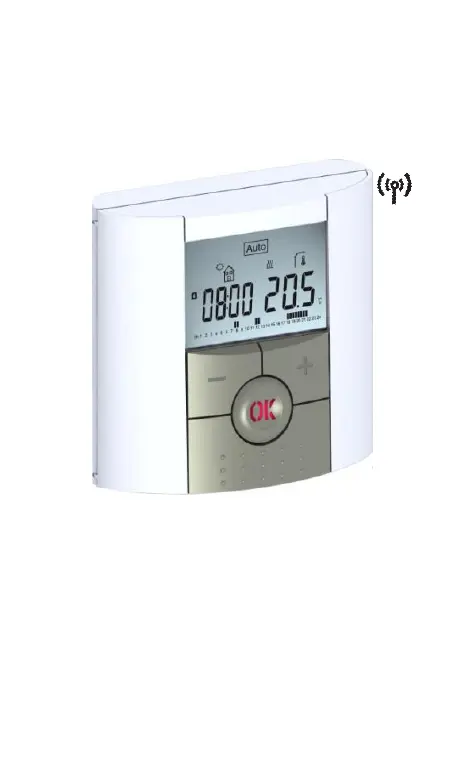
Watts Industries BT-DPRF-02 - User Manual

Watts Industries BT-DPRF-02
126 pages
Print Icon
To Next Page IconTo Next Page
Loading...
1
BT-DPRF-02

Table of Contents

Questions and Answers

  • D
    Debbie TorresAug 3, 2025
    Why is my Watts Industries Thermostat temperature not matching the program?
    • W
      wallaceryanAug 3, 2025
      If your Watts Industries Thermostat appears to function correctly, but the room temperature doesn't match the programmed settings, verify the clock's accuracy. Also, consider whether the difference between the Comfort and Reduced temperature settings is too large, or if the program steps are too short. If you're using an energy saver, ensure it's functioning correctly.
  • A
    Amber MontesAug 9, 2025
    What to do if my Watts Industries BT-DPRF-02 Thermostat is working but the heating is not?
    • K
      Kimberly HessAug 9, 2025
      If your Watts Industries Thermostat seems to be working fine, but the heating isn’t functioning correctly, ensure the RF signal reception is good and check all connections. Also, verify the power supply to the heating element.
  • J
    Jeffrey SmithAug 13, 2025
    How to fix a Watts Industries BT-DPRF-02 that won’t turn on?
    • H
      Heather PerezAug 13, 2025
      If your Watts Industries Thermostat doesn't start, check the batteries. Ensure the protection sticker has been removed, verify the batteries are correctly oriented, and check their capacity.
  • R
    Robert WilliamsAug 18, 2025
    What does it mean if my Watts Industries BT-DPRF-02 Thermostat LED is blinking red?
    • A
      Ashley KnightAug 18, 2025
      If the LED on your Watts Industries Thermostat is blinking red, it indicates a sensor problem. Check the sensor connection on the receiver. If that doesn't resolve the issue, disconnect the sensor and check it with an ohmmeter; the value should be around 10 kohms.
  • A
    Anna GreenAug 23, 2025
    How to solve low battery level on Watts Industries Thermostat?
    • R
      robinsoneduardoAug 23, 2025
      To address low battery levels in your Watts Industries Thermostat, replace the batteries.
  • A
    Amanda ThompsonAug 28, 2025
    How to improve RF communication for Watts Industries BT-DPRF-02 Thermostat?
    • J
      Jordan WadeAug 28, 2025
      To improve RF communication with your Watts Industries Thermostat, ensure the receiver is at least 50cm away from other electrical or wireless devices like GSM or Wi-Fi equipment. Also, avoid fixing the receiver on metallic parts or near hydraulic pipes, especially copper ones.

Summary

IMPORTANT!

Application Details

Details on thermostat application in residential, office, and industrial facilities for electrical heating systems.

1 Presentation

Key Features

Highlights key features including wireless communication, programmability, and energy optimization.

1.1 Keyboard

Details the functions of the thermostat's control buttons: Minus, OK, Plus, Navigation, and Edition keys.

1.2 LED & Display

Explains the meaning of LED indicators and symbols shown on the thermostat's LCD display.

2 First Installation

2.1 Batteries installation

Instructions for correctly inserting the 2 AAA alkaline batteries into the thermostat compartment.

2.2 Time and Date adjustment

Guide on how to set the current time and date using the thermostat's controls.

2.3 RF installation

Steps for configuring the thermostat with the RF receiver for wireless communication.

2.4 Starting

Information on the thermostat's initial operational state and default program settings.

3 Working mode definition

3.1 Autonomous working

Explains how to select and use different operating modes available for the thermostat.

3.2 In combination with Central

Describes how the thermostat operates as a remote unit when used with a wireless central system.

4 Special function

4.1 Keyboards lock Function

Instructions on how to activate and deactivate the keyboard lock to prevent unauthorized setting changes.

4.2 Open window function

Explains the automatic detection of open windows and how the thermostat responds to save energy.

4.3 Information

How to view current temperatures from connected sensors using the escape key scroll function.

5 Parameters menu

6 Technical characteristics

7 Troubleshooting & Solution

8 Advanced installers parameters menu

Annexes (Built-in Program description)

P1: Built-in Program Description

Detailed hourly schedule for built-in program P1, showing active heating periods.

P2: Built-in Program Description

Detailed hourly schedule for built-in program P2, showing active heating periods.

P3: Built-in Program Description

Detailed hourly schedule for built-in program P3, showing active heating periods.

P4: Built-in Program Description

Detailed hourly schedule for built-in program P4, showing active heating periods.

P5: Built-in Program Description

Detailed hourly schedule for built-in program P5, showing active heating periods.

P6: Built-in Program Description

Detailed hourly schedule for built-in program P6, showing active heating periods.

P7: Built-in Program Description

Detailed hourly schedule for built-in program P7, showing active heating periods.

P8: Built-in Program Description

Detailed hourly schedule for built-in program P8, showing active heating periods.

P9: Built-in Program Description

Detailed hourly schedule for built-in program P9, showing active heating periods.

Watts Industries BT-DPRF-02 Specifications

General IconGeneral
BrandWatts Industries
ModelBT-DPRF-02
CategoryThermostat
LanguageEnglish

Related product manuals