The Universal Antenna Mount is designed, sold, and supported by Waveform and our team of Signal Specialists. If you have any
feedback on how we could make this mount or manual better, we’d love to hear from you.
We love hearing our customer’s experience with our products, so please reach out!
v2
Questions? Suggestions? Need help? Call 1-800-761-3041, or email help@waveform.com
waveform.com
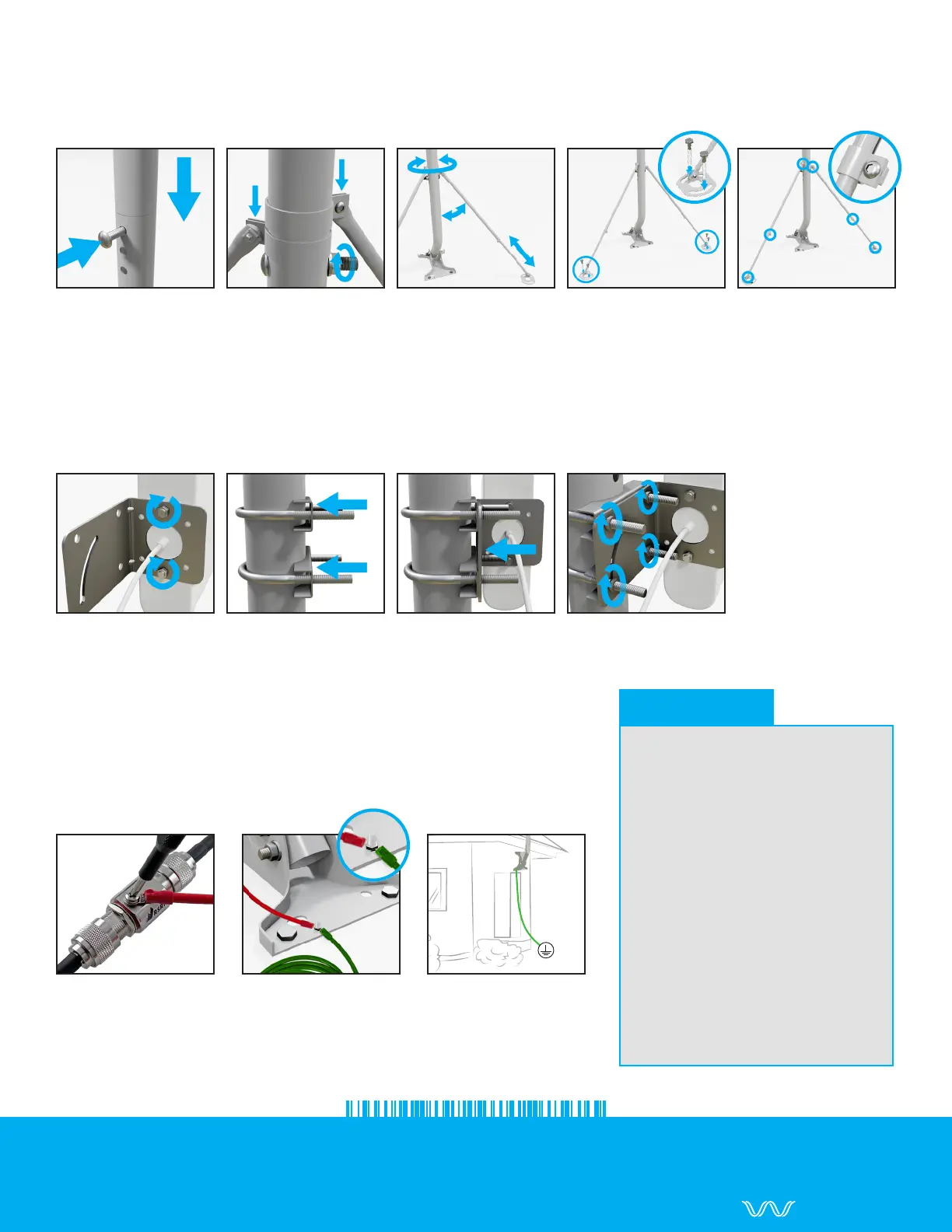
1. Insert Extension Pole
into J-Pole. Install lock
Bolt.
2. Secure Bolt with a
Washer and Nut. Attach
Brace Arms.
Assembling the Extension Kit
Use the provided Size-8/10mm Wrench and Size-4mm Allen Wrench to assemble the Extension Kit. Follow
the steps listed below:
3. Adjust Brace Arms
into position.
Attaching an Antenna to the Universal Antenna Mount
These details depend on the antenna you’ve purchased. The steps below describe how to attach the
L-Bracket and U-Bolt assembly included with many of our Waveform antennas.
1. Attach L-Bracket to
the Antenna.
3. Install L-Bracket onto
Clamps and U-Bolts.
4. Secure assembly
with Washers and Nuts.
5. Tighten each Brace
Arm Bolt into place.
4. Install Footpads
against a surface.
1. Attach a Ground
Wire to an In-line Surge
Protector (as shown) or to
the Antenna’s Grounding
Port.
Grounding the Universal Antenna Mount
Grounding an antenna mast is highly recommended. It’s required by
the National Electric Code (NEC) and the mast’s metal frame makes it
a prime target for lightning strikes. Follow the steps listed below:
3. Attach the Ground
Wire to an suitable
Electrical Ground.
2. Attach the Ground
Wire(s) to the Footpad’s
Grounding Bolt. Secure
the assembly with a Nut.
2. Position Clamps and
U-Bolts onto the Pole.
• The NEC recommends a 10
AWG or lower gauge (thicker)
for grounding cables.
• In-Line Surge Protectors
can protect your equipment
& prevents lightning from
entering your home through
the cable.
• If you’re unsure about your
grounding setup, reach out to
an electrical contractor.
• Learn which Electrical Grounds
are suitable and more at
waveform.com/grounding
Grounding Tips



 To Previous Page
 Loading...