¯ 2004 Wave Frontier Co T55
Please refer to the setup information provided
to you. If you have not received the
information, please request your zip code
specific information at the “Setup Info” section
on www.WaveFrontier.US
.
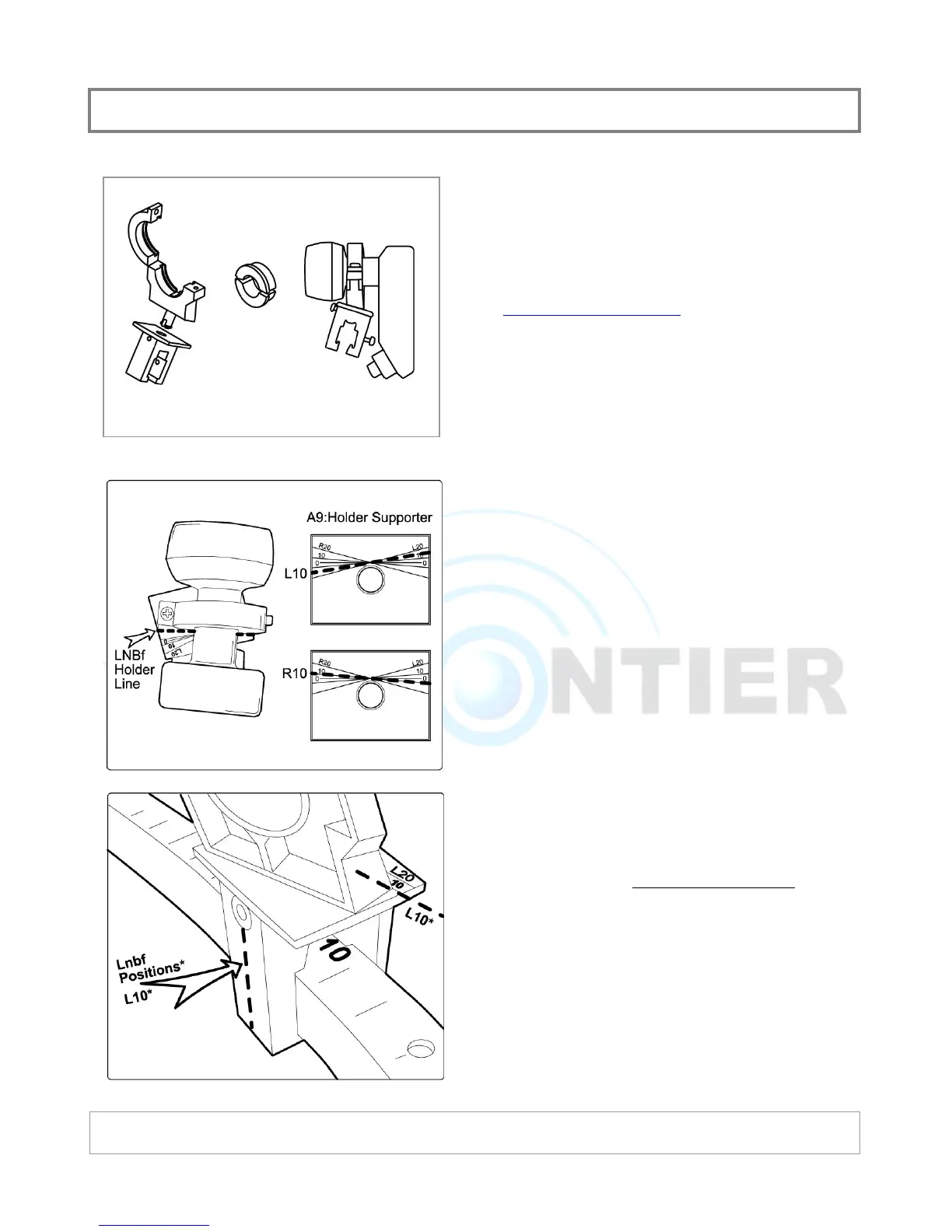
Assemble holder parts by hand at this stage.
Adapter will be required if neck size of your
LNBF is less than 40 mm.
Align the LNBF holder line to the corresponding
scale on the holder supporter. If your setup
info indicates that “A” satellite is L10, rotate
the holder till holder line reaches the L10 line
on the supporter.
This adjustment has a minimal impact on
signal strength. If you setup info indicates a
value with decimal number such as L14.7,
place between L10 and L20.
Place your pre-assembled holder onto the
guide. Locate the center of the holder
to the
value give on the information. If your setup
info indicates that “A” satellite is at L10, place
the holder at L10 on the guide.
You will be making adjustment of this location
when you do the fine tuning of Toroidal
alignment at the final stage.
PRE-ALIGNMENT: LNBF HOLDE


 To Next Page