1. Setting up the Hardware:
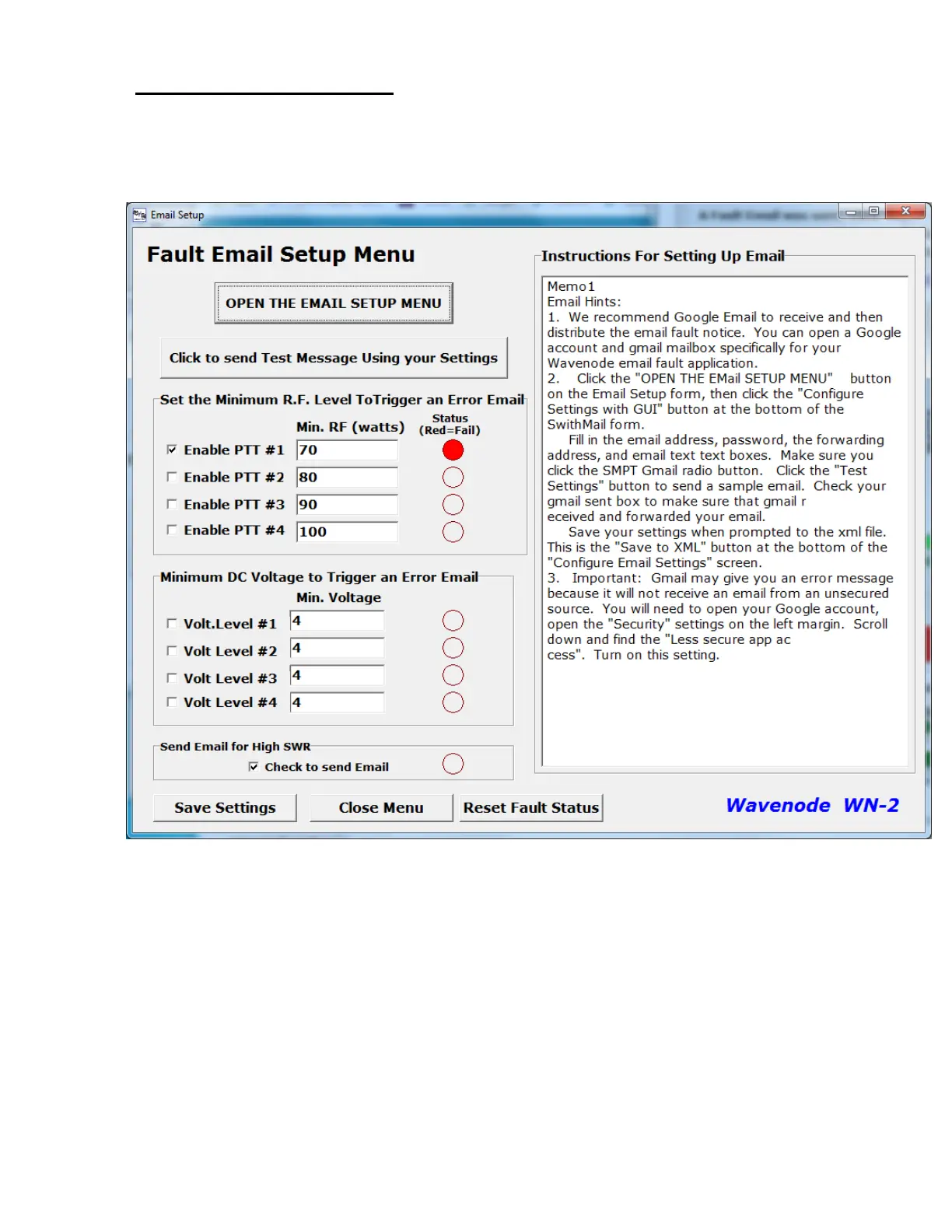
After performing any external wiring necessary as shown in the link above, set up your email
addresse(s) as necessary in the “Email” item on the WN-2 software menu bar. The menu is
shown below in Figure #2.
Figure #2. The Email Setup menu
Use the checkboxes to set which fault conditions will trigger a fault email. Set the low power
levels or power supply levels in the text boxes next to the check boxes. Click the “Save Settings”
to save your selections.
Notice that the fault that triggered the email will show a Red circle next to it. Use the “Reset
Fault Status” button to reset all the indicated faults. When a fault email is sent, no additional fault
emails will be sent until the “Reset” button is clicked as shown below in Figure #3. This eliminates
a flood of emails sent to the email address.


 To Next Page
 Loading...