Chapter 2 – Quickstart Guide
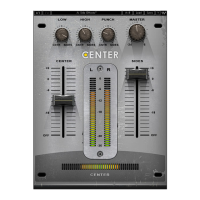
• Load Waves Center on a stereo track.
•
Use the Center and Sides faders to adjust their balance. For example, to
trim
down lead vocals, slide the Center fader downwar
ds.
•
The Center meter indicates when center content
is detected.
• Use the High control to balance high frequency content between the Center and
Sides. For example,
you can move the high freq
uency content of overhead drum
mics by repositioning it to the sides.
• Use the Low control to balance low frequency content between the Center and
Sides. For example, afte
r lowering vocal levels by mo
ving the Center fader
downwards, lost low frequency content can be restored by turning the Low
control toward the Sides.
•
Use the Punch control to adjust the spread of transient conte
nt between the
Center and Sides. For e
xample, afte
r lowering vocal levels by mo
ving the Center
fader downwards, lost transient information can be restored by turning the Punch
control toward the Sides.
•
Adjust the ov
erall gain by using the Master gain control.
Waves Center
User Guide
5


 To Next Page