EasyManua.ls Logo

Wavetek 171 - Page 8

Default Icon
43 pages
Print Icon
To Next Page IconTo Next Page
To Previous Page IconTo Previous Page
Loading...
SECTION
k
INITIAL
PREPARATION
2.1
UNPACKING
INSPECTION
After
carefully
unpacking
the
instrument,
inspect
the
exter-
nal
parts
for
damage
toknobs,
dials,
indicators,
surface
areas,
etc.
If
there
is
damage,
file a
claim
with
the
carrier
who
transported
the
instrument.
Retain
the
shipping
container
and
packing
material
for
use
in
case
reshipment
is
required.
2.2
PREPARATION
FOR
USE
Before
connecting
the
instrument
to
line
power,
be
sure
the
rear
panel
1 1
5/230V
and
H l/LO
switches
are
set
to
the
value
nearest
the
line
voltage
and
that
the
fuse
is
correct
for
the
switch
setting.
Be
sure
that
the
plug
on
the
power
cord
is
the
proper
mate
for
the
line
receptacle.
AC
Line
Voltage
Switch
A
Switch
B
Fuse
(SB)
90-110
115
LO
3/8
amp
105-125
115
HI
3/8
amp
180
-
220
230
LO
3/16
amp
210-250
230
HI
3/16
amp
2.3
ELECTRICAL
ACCEPTANCE
CHECK
This
checkout
procedure
verifies
the
generator
operation.
If
a
malfunction
is
found,
refer
to
the
Warranty
in
the
front
of the
manual.
An
oscilloscope,
counter,
three
short
lengths
of
50f2
coax
cable,
a
50ft
feedthru
load
and
a
0
to
±2V
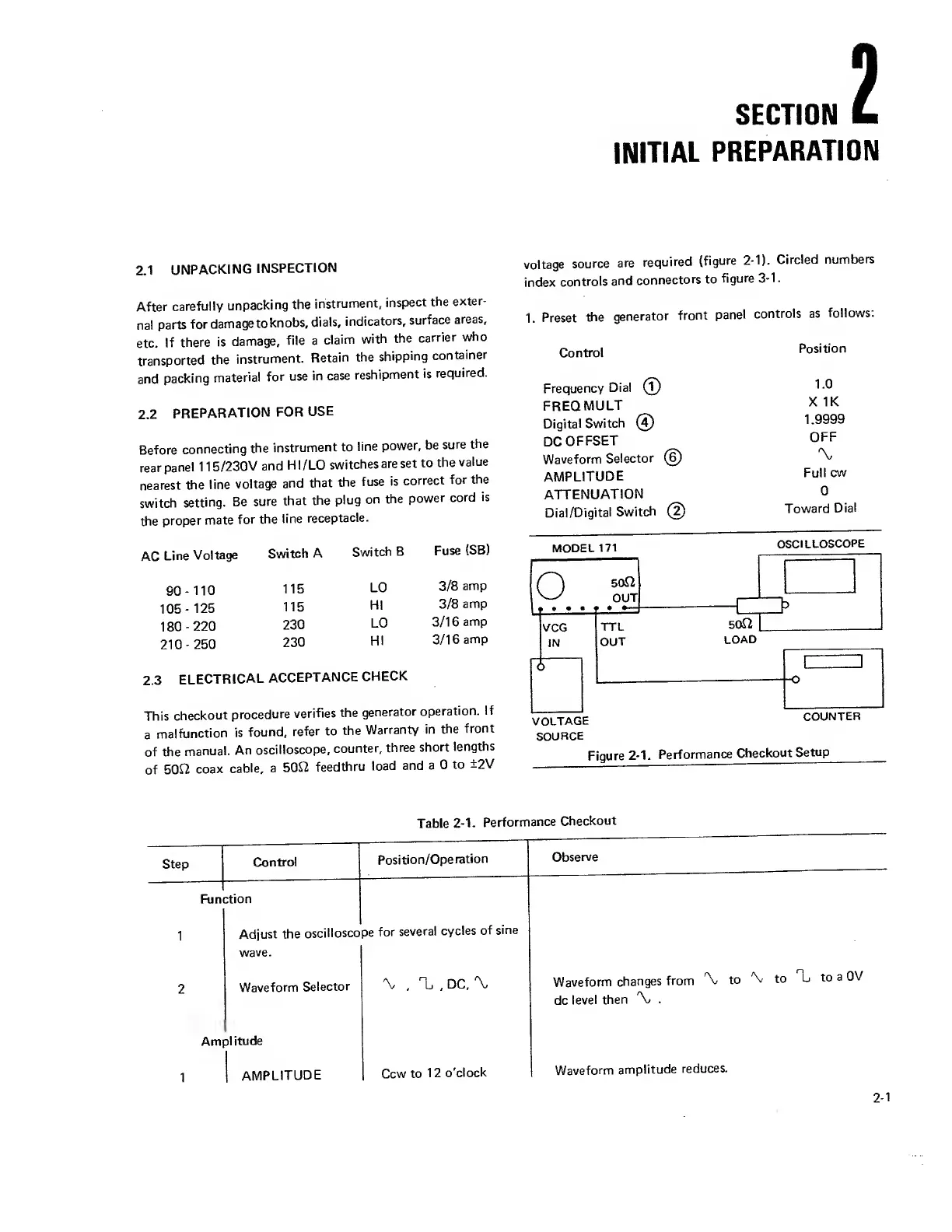
voltage
source
are
required
(figure
2-1).
Circled
numbers
index
controls
and
connectors
to
figure
3-1
.
1.
Preset
the
generator
front
panel
controls
as
follows:
Control
Position
Frequency
Dial
(T)
1.0
FREQ
MULT
X IK
Digital
Switch
(5)
1.9999
DC
OFFSET
OFF
Waveform
Selector
(6)
'X,
AMPLITUDE
Full
cw
ATTENUATION
0
Dial/Digital
Switch
(5)
Toward
Dial
MODEL
171
OSCILLOSCOPE
SOURCE
Figure
2-1.
Performance
Checkout
Setup
Table
2-1.
Performance
Checkout
Step
Control
Function
Position/Operation
Adjust the
oscilloscope
for
several
cycles
of
sine
wave.
Waveform
Selector
Amplitude
'V
,
1j
,
DC,
\
Observe
Waveform
changes
from
to
\ to
1 to
a
OV
dc
level then
.
1
AMPLITUDE
Ccw to
12
o'clock
Waveform
amplitude
reduces.

Other manuals for Wavetek 171