EasyManua.ls Logo

Wavetek 171 - Page 9

Default Icon
43 pages
Print Icon
To Next Page IconTo Next Page
To Previous Page IconTo Previous Page
Loading...
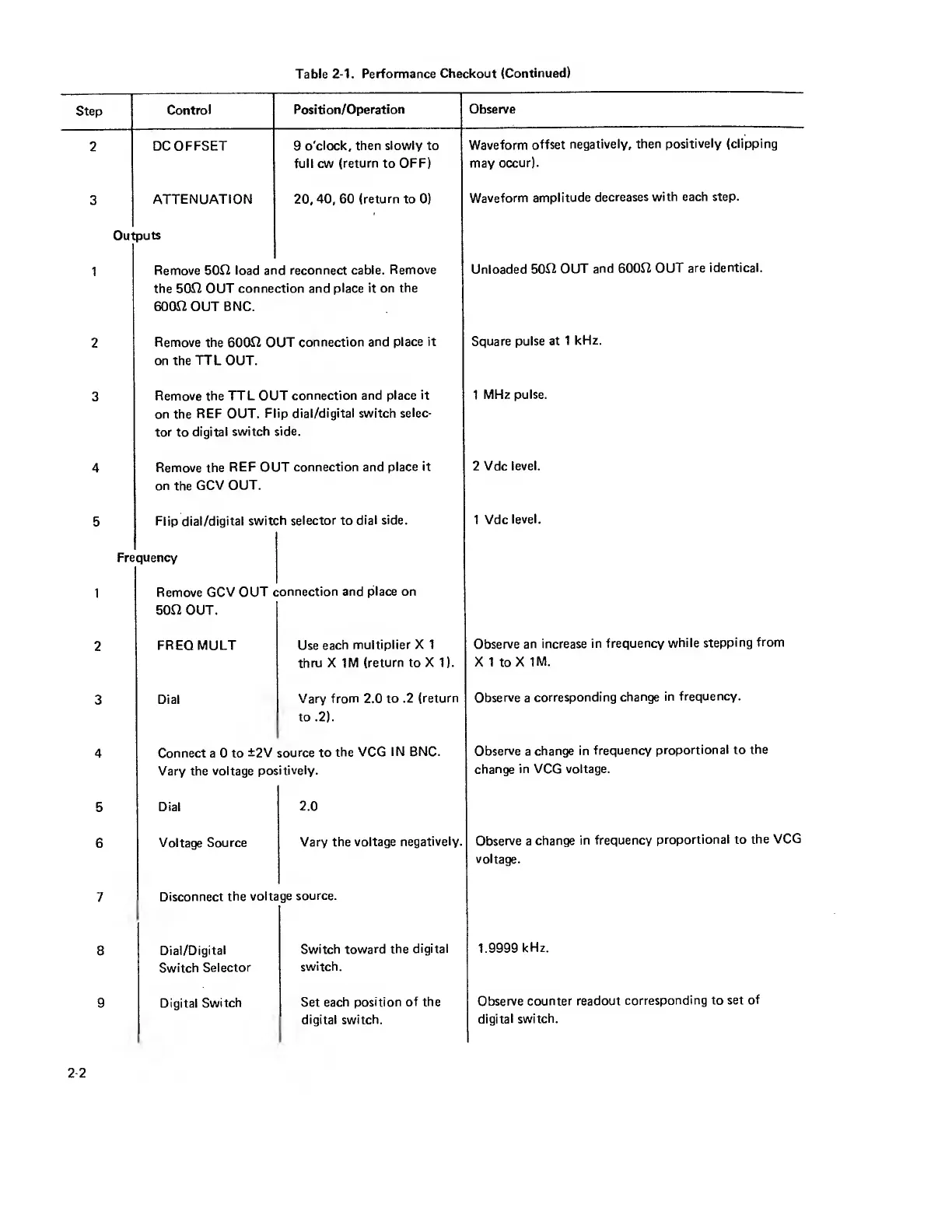
Table
2-1.
Performance
Checkout
(Continued)
Step
Control
Position/Operation
Observe
2
DC
OFFSET
9
o'clock, then
slowly
to
Waveform offset
negatively, then positively
(clipping
full cw
(return
to
OFF) may
occur).
3
ATTENUATION 20,
40,
60
(return to
0)
Waveform
amplitude
decreases
with each step.
Outputs
1
Remove 500
load and reconnect
cable. Remove
Unloaded
500
OUT
and 6000
OUT
are identical,
the 500 OUT connection
and place it on
the
6000
OUT BNC.
2
Remove the 6000 OUT
connection and
place it
Square pulse
at
1
kHz.
on the
TTL
OUT.
3
Remove the
TTL OUT
connection and place
it 1
MHz pulse,
on the
REF OUT.
Flip dial/digital switch
selec-
tor
to
digital
switch side.
4
Remove the
REF
OUT
connection and
place it
2
Vdc
level,
on
the
GCV OUT.
5
Flip dial/digital
switch selector to
dial
side.
1 Vdc
level.
Frequency
1
Remove
GCV OUT
connection and
place on
50f2 OUT.
2
FREQ MULT Use
each
multiplier X 1
Observe
an increase
in
frequency
while stepping
from
thru X
1M (return to X 1). X
1 to X
1M.
3
Dial
Vary from 2.0
to
.2
(return
Observe
a
corresponding
change
in
frequency.
to .2).
4
Connect a 0 to
±2V source to
the VCG
IN BNC.
Observe a
change
in frequency
proportional to
the
Vary the
voltage
positively.
change
in VCG voltage.
5
Dial
2.0
6
Voltage Source
Vary
the
voltage negatively.
Observe a
change
in frequency
proportional to
the
VCG
voltage.
7
Disconnect
the
voltage
source.
8
Dial/Digital
Switch toward
the
digital 1.9999
kHz.
Switch
Selector
switch.
9 Digital
Switch
Set
each position
of the
Observe
counter readout
corresponding to set
of
digital switch.
digital switch.
2-2

Other manuals for Wavetek 171