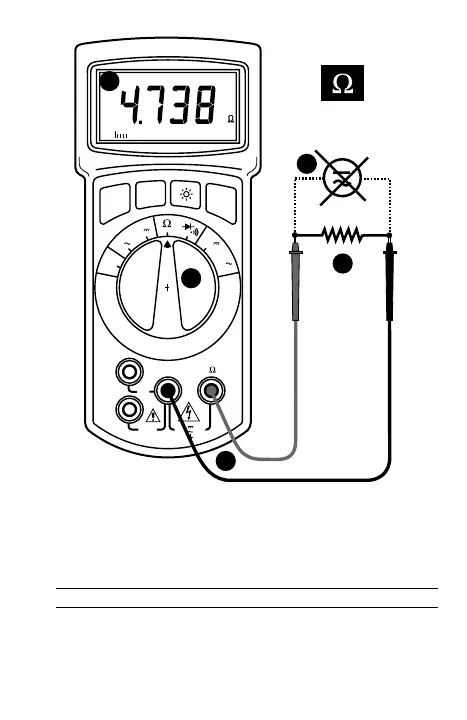
inaccurate readings.❷ Connect test leads as shown in figure 3. ❸ Set
Function/Range Switch to Ω position. ❹ Connect test leads to circuit being
measured. ➎ Read resistance value on Digital Display. Open circuits will be
displayed as “I.OL”.
Note: When measuring very low resistances, use Relative Measurement to
eliminate the test lead resistance (see Menu Functions, page 23).
D • Widerstandsmessung (siehe Fig. 3)
❶
Jede Spannung vom Widerstand abschalten und Kondensatoren entladen. Eine
am Widerstand anliegende Spannung würde das Resultat verfälschen.
❷
Rotes
Meßkabel mit V•Ω Eingang und schwarzes mit COM verbinden.
❸
Funktions-
schalter auf Ω-Position stellen.
❹
Meßspitzen mit Widerstand/ Schaltkreis
verbinden.
➎
Meßwert ablesen. Ein offener Schaltkreis wird mit Überlast angezeigt.
- 17 -


 To Next Page