

EasyManua.ls Logo

WaveWare WT 802 - User Manual

WaveWare WT 802
2 pages
Print Icon
To Next Page IconTo Next Page
Loading...
WaveWare Technologies, Inc.
“Enhancing Mobile Alert Response”
Visit Our Website at:
www.WirelessMessaging.com
2630 National Dr. Garland TX. 75041 PH: 1.800.373.1466
Part Number = WT-802
Powered By Daviscomms
WT 802 Button Programming Guide
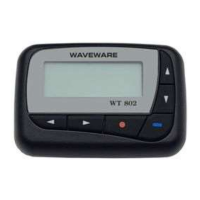
- - - The WaveWare WT 802 Alphanumeric Pager
- - - Button Programming Allows the Editing of the:
- - - Frequency: Between 450 - 470 MHz
- - - Cap Code(s): Up to 7 Cap Codes
- - - Baud Rate: 512, 1200 and 2400
- - - Password: Protection of the Configuration
- Before beginning, become Familiar with the Buttons...
- The Function Button (Red Dot), Part of its Function is...
- - Moves you to the Next Step / Screen
- - - Allowing the Viewing of Each Individual Screen
- The Read / On Button (Blue Dash), Part of its Function is...
- - Pressing this at anytime Exits Program Mode
- - - Returns you to the Version Screen
- The 4 Arrow Buttons (Up, Down, Backward and Forward)
- - Allows the Changing of the Location and Values of the Cursor
- To Start, be sure the Pager is TURNED-OFF
- - To do this, Press the Read / On Button (Blue Dash)
- - The Pager will Display "Pager Off"
- Remove "AA" Battery from the Pager
- - Refer to the User Manual
- Press and Hold the Function Button (Red Dot), and…
- - Press and Hold the Read / On Button (Blue Dash)
- - - Now, while Pressing the 2 Buttons, Re-Insert the "AA" Battery
- This will Place Pager into "Test Mode"
Question and Answer IconNeed help?

Do you have a question about the WaveWare WT 802 and is the answer not in the manual?

Summary

WT 802 Button Programming Guide

Button Programming Capabilities

Lists editable parameters: Frequency, Cap Codes, Baud Rate, and Password protection.

Understanding Pager Buttons

Details functions of Function (Red Dot), Read/On (Blue Dash), and Arrow buttons.

Initial Setup for Programming

Steps to turn off pager and enter Test Mode using specific button presses and battery insertion.

WT 802 Pager Configuration

Test Mode and Version Display

Displays firmware version, date, and time upon entering Test Mode.

Entering Program Mode

Navigates to the password screen by pressing the Function button from Test Mode.

Password Configuration

Sets or edits the pager's password, defaulting to all zeros.

Frequency Configuration

Configures the pager's operating frequency (VHF/UHF) in a specific numeric format.

Baud Rate Configuration

Sets the communication baud rate from options like 512, 1200, or 2400.

Cap Code Configuration

Enters the 7-digit Cap Code, including leading zeros, dependent on the host system.
WaveWare WT 802 Specifications

General IconGeneral
BrandWaveWare
ModelWT 802
CategoryPager
LanguageEnglish