2 secs 2 secs
PULL
PULL
PULL
PULL
PULL
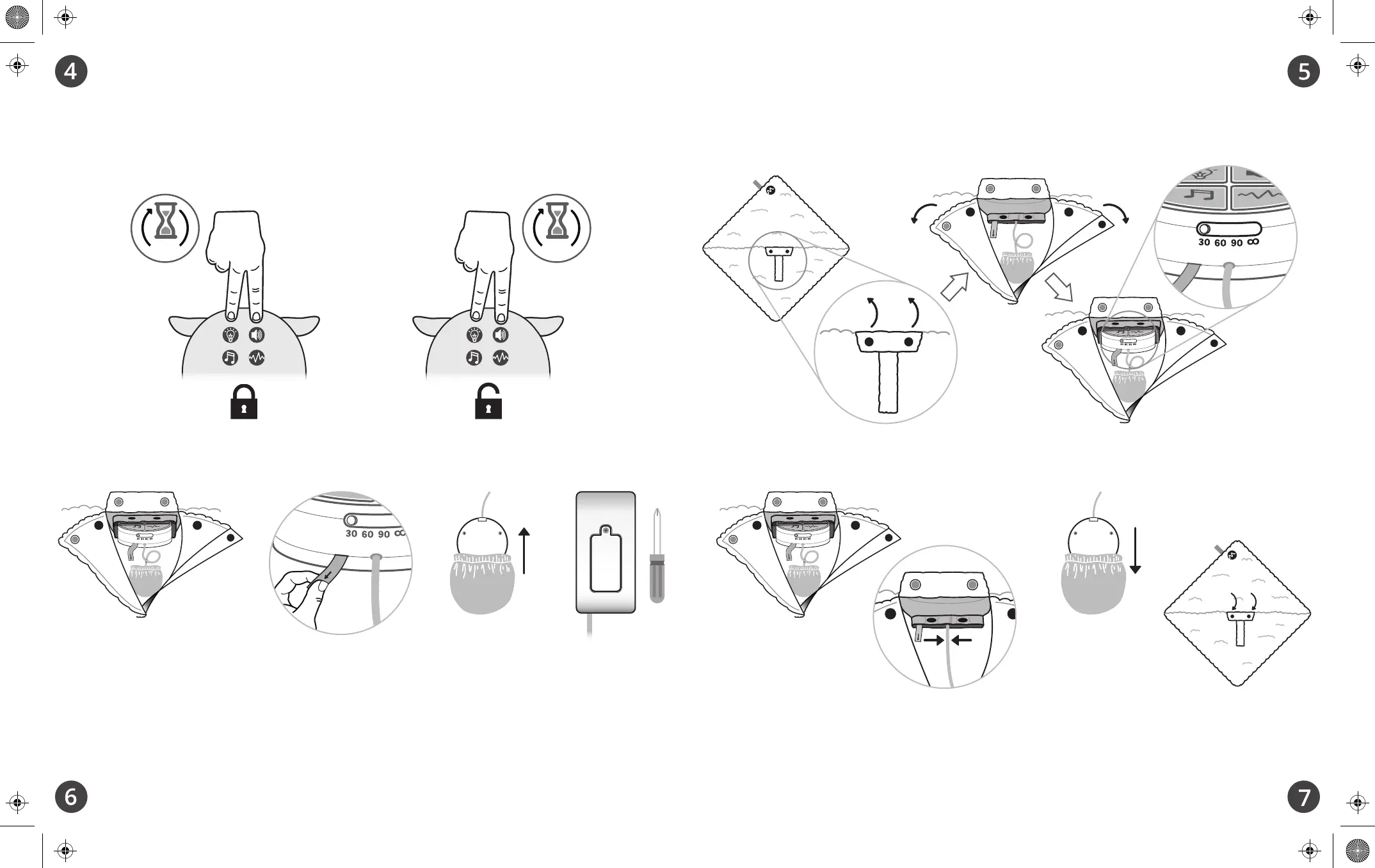
There may be times you'd rather your child not be able to accidentally change the light or sound that is
playing. That is why the LoveBub includes a lock feature.
While the unit is on, press and hold any 2 buttons at the same time to lock the current settings in place
(light will flash 2 times to confirm lock) Press and hold any 2 buttons again to unlock (light will flash 3
times to confirm unlock)
Any time the LoveBub is on, it will automatically fade out and turn off after the timer has elapsed.
You may also choose to have it play continuously until you turn it off.
1. On the underside of the unit, unsnap and pull apart flap
2. Undo the 2 additional snaps on the interior pouch
3. Adjust timer by sliding the switch to 30, 60, 90 min or
∞
(continuous play)
1. When returning the module to the interior pouch, be sure to orient it so that the module
buttons face the back of the LoveBub’s head.
2. Center the cable between the 2 snaps before snapping closed the interior pouch.
3. Return the light to its pocket with the bulb side facing the topside of the LoveBub.
4. Close and snap down flap.
To remove the module completely from your LoveBub in order to change batteries
(or before putting it in the washing machine):
1. Access the module (as you did in #5), then pull the white ribbon marked “Pull” to
remove the module from the interior pouch.
2. Gently remove the light from its small pocket.
3. Use screwdriver to remove battery compartment door on the side of the module.
4. Replace the 2 AAA batteries.
Lock Feature Set the Timer
Battery Replacement Returning the Module


 To Previous Page
 Loading...