9
CH5/6
OUT
FL/FR IN
RL/RR IN
CH1/2
OUT
CH3/4
OUT
CH7/8
OUT
RLC
REM IN
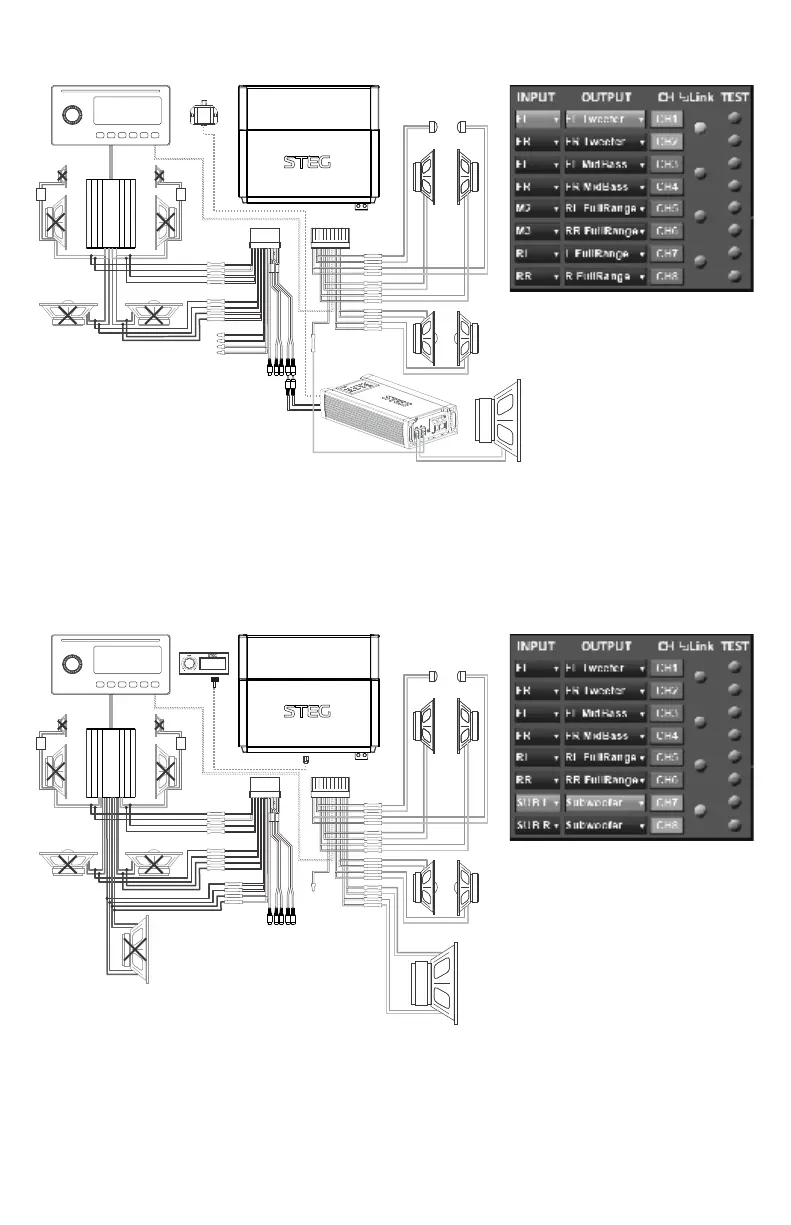
SDSP6 SYSTEM EXAMPLE: 4-IN/8-OUT
Note: In this system example, all 6-channels of the SDSP6’s powered outputs are used for front 2-way
components and rear full-range speakers. For adding a subwoofer amplifier, the CH5/6 preouts may be
used. Depending on the available input channels, the signal feeding CH5/6 may be derived as a sum of the
front and rear input signals from a 4-channel source as shown. However, since the SDSP6’s CH5/6 preouts
are not assignable as subwoofer channels for the purpose of sub volume control from the optional DRC
remote, a separate RLC for the subwoofer amplifier is needed if remote sub level control is desired.
SDSP8 SYSTEM EXAMPLE: 6-IN/8-OUT
REM
OUT
FL/FR IN
RR/RL IN
CH1/2
OUT
CH3/4
OUT
CH5/6 OUT
REM IN
DRC
CH7/8
OUT
SUB L/R IN
Note: In this system example, all 8-channels of the SDSP8’s powered outputs are used for front 2-way
components, rear full-range speakers and a dual voice coil subwoofer. In this configuration, the optional
DRC remote can be used sub volumel control over CH7/8 powered outputs while CH7/8 preouts are not
used. As shown, the factory amplifier provides Front, Rear and Sub input channels, which matches the pre-
set 6CH setting in section of the DSP tuning software. For a dual voice coil subwoofer, ③ the CH7 and CH8
output channels should be set as “Sub Mono” in section level trim sliders linked in section . ④ with the ⑦


 To Next Page
 Loading...