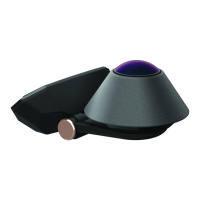
The Waylens Secure360 Wi-Fi is a sophisticated 360-degree camera system designed for in-vehicle use, offering comprehensive surveillance and recording capabilities. It provides drivers with an easy way to control the camera and access important data through a dedicated mobile application.
Function Description:
The primary function of the Secure360 Wi-Fi is to record video in a 360-degree field of view, both inside and outside the vehicle. This allows for a complete visual record of events, which can be crucial for accident reconstruction, security monitoring, and general driving documentation. The camera is equipped with various sensors to detect events such as motion, impact, and collision, triggering specific recording behaviors. It integrates with a mobile app (available on App Store and Google Play) that serves as the main interface for managing the device. Through the app, users can sync the camera to their Waylens account, change camera settings, update firmware, view events, and playback/share video. For the 4G model (not explicitly detailed in the provided pages but mentioned in the app features), additional functionalities like real-time monitoring, receiving alerts, and accessing the Waylens Cloud are available, suggesting advanced connectivity options. The device is designed for continuous recording, making it suitable for long-term surveillance.
Important Technical Specifications (derived from context):
- Connectivity: Wi-Fi (for app communication and data transfer), optional 4G for advanced features (on the 4G model).
- Power Options:
- Direct Wire: Connects directly to the vehicle's fuse box, utilizing both switched (ACC) and constant (BATT+) power sources. This ensures the camera can operate even when the vehicle is off, for parking surveillance.
- Battery Pack Power Cord: Uses a 12V Type-C Power Adapter and a USB Type-C Cable, powered by a battery pack. The battery pack should be secured in a shaded area like the glove box or center console to avoid direct sunlight and high temperatures.
- Storage: microSD card slot, supporting high endurance MLC microSD cards (Class 10 or higher, 32-256GB) for continuous recording.
- Sensors: Ambient Light Sensor, motion, impact, and collision detection sensors.
- LED Indicators:
- Status LED:
- Solid white: Power On/Idle
- Solid red: Recording
- Blinks white: Firmware updating
- Blinks white and red: Error
- Logo LED: (Function not explicitly detailed, but likely indicates power or operational status).
- Buttons:
- Waylens Button: Press for 1 second to start/stop recording; press for 5 seconds to turn off the camera.
- Reset Button: (Function not explicitly detailed, but typically used for device resets).
- Mounting: Mount Plate with adhesive for secure attachment to the windshield.
- Power Connection: USB Type-C port on the Secure360 Wi-Fi Dock.
Usage Features:
- Easy Installation: The manual provides clear instructions for both direct wire and battery pack power options, along with steps for mounting the camera.
- App-Controlled Interface: The Waylens Secure360 Wi-Fi App is central to its operation, allowing for remote control, settings adjustments, and data access.
- 360-Degree Vision: Captures a comprehensive view around the vehicle, enhancing security and recording capabilities.
- Event Detection: Automatically detects and records events like motion, impact, and collisions, with configurable sensitivity settings ("Motion," "Impact," "Collision," "Off").
- Firmware Updates: Can be updated via the mobile app, ensuring the device remains current with the latest features and improvements.
- Video Playback and Sharing: Users can view recorded events and videos directly from the app and share them as needed.
- Adjustable Camera Angle: The camera's angle can be adjusted post-installation using a coin to loosen/tighten a hinge, allowing for optimal positioning parallel to the road.
- Secure Mounting: The Mount Plate uses a strong adhesive to ensure the camera remains firmly attached to the windshield.
- Power Management: Designed to operate continuously, even when the vehicle is off, through constant power connection, providing parking surveillance.
Maintenance Features:
- microSD Card Management: Requires a high endurance microSD card, and users are advised to format it via the app before first use to prolong its lifespan and prevent errors. The manual warns against removing the card while recording.
- Firmware Updates: Regular firmware updates via the app help maintain optimal performance and introduce new features.
- Power Disconnection: Recommended to disconnect power from the camera when not in use for an extended period.
- Secure Component Placement: Users are advised to secure the camera and power components out of reach of passengers, especially children and pets.
- Mounting Verification: Ensure the Mount Plate is firmly attached and the camera is properly secured to the Mount Plate before operating the vehicle.
- FCC Compliance: The device adheres to FCC regulations, and users are cautioned against unauthorized modifications. It also specifies a minimum distance of 20cm between the radiator and the user's body for radiation exposure.

 Need help?
 General

 To Next Page