Wall or Other Mounting with VESA
Standard
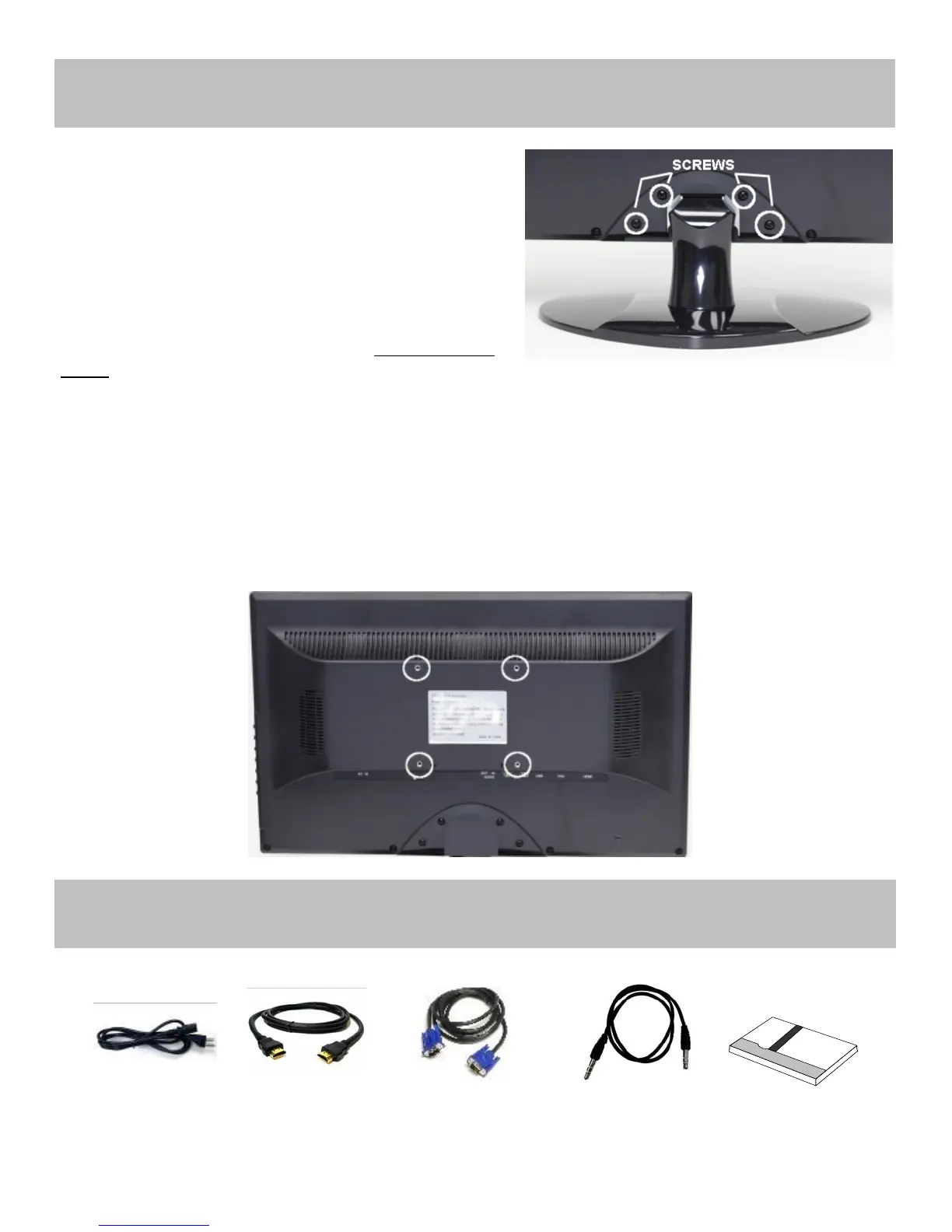
CAUTION: The wall mount must bear a minimum of five times
the monitor‟s net weight. To mount your MONITOR to the wall or
another surface, you need to purchase a VESA wall mount. Use
four M4 x 8mm screws (the base attachment screws removed in
step 1 below are M4 x 8mm) to attach the mount. The monitor
mount VESA hole pattern is 100mm x 100mm. Note: Metric (M4 x
8 mm) is the type screw that should be used (do not use longer
screws or the monitor may be damaged).
1. Before mounting the monitor, remove the base riser (vertical portion of the base) by removing the four screws near
the top with a screwdriver. Then the base and the riser can be removed. In order to prevent losing these screws,
we suggest replacing the screws in their original holes.
2. Attach the VESA mount (100mm x 100mm) plate to the rear of the monitor and follow all of the instructions provided
with the mount to complete the mounting process.
Power Cord HDMI Cable VGA Cable Audio Cable User Guide
Also available Online
Mounng Guide
Accessories


 To Next Page