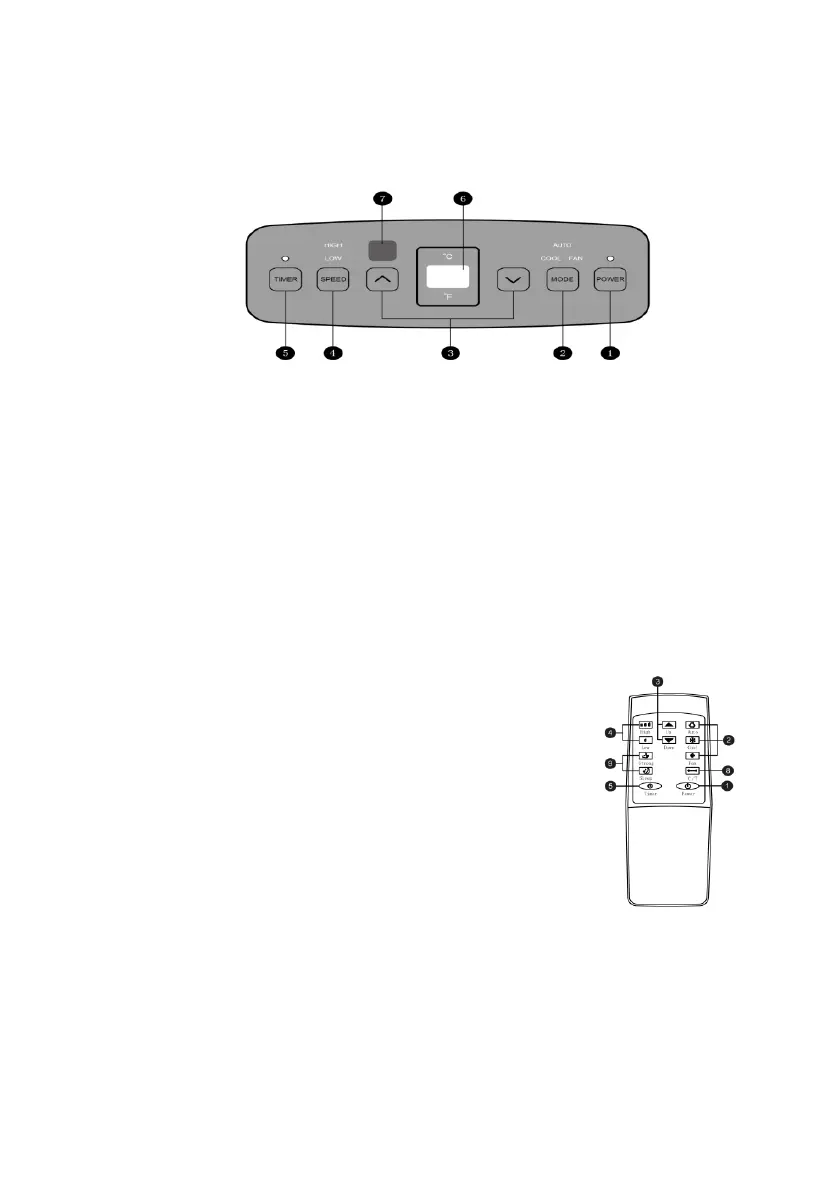
CONTROL PANEL AND REMOTE CONTROLLER
1. Power key
Press the key to turn ON/OFF the A/C.
2. Mode key
Press the key to choose cooling, wind and dehumidification mode.
3. Temperature/ time adjusting key
Press the key at cooling mode to increase/reduce the setting temperature; press it at
timing mode to adjust timing ON/OFF time; press Up and Down keys simultaneously to
switch Fahrenheit and Centigrade degree temperature.
4. Speed key
Press the key to choose high/ low gear wind speed.
5. Timer key
Press the key at standby mode to set ON time.
Press this key at ON mode to set OFF time.
6. Temperature/ time display window
This window displays the adjusted temperature and time.
7. Remote controller receiving window
This window is used to receive signal of the remote controller.
8. ℃/℉ switching key
Press the key to switch ℃ and ℉
9. Sleep choice key
Sleep mode can be selected by pressing the corresponding key in the cooling mode.


 To Next Page