EasyManua.ls Logo

WEATHER DIRECT MD319 - User Manual

WEATHER DIRECT MD319
30 pages
Print Icon
To Next Page IconTo Next Page
Loading...
Owner's Manual
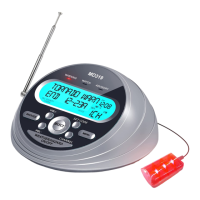
All Hazards Weather
Alert Radio
MD319
Thank you for purchasing our products. Please read this
manual carefully before using this product. If you encounter
any difficulties or problems during use, please contact us for
further assistance.
AM
W X
ALL
CODES
COUNTY VOICE
MD319

Questions and Answers

  • A
    Alyssa MartinezAug 6, 2025
    What to do if WEATHER DIRECT Radio is not responding to NWS weather alert broadcasts?
    • J
      Joseph BakerAug 6, 2025
      If your WEATHER DIRECT Radio isn't responding to NWS weather alert broadcasts, verify that you have programmed the correct S.A.M.E. County Code(s). Also, check with the NWS to confirm that the tower is broadcasting.
  • C
    Cheyenne ReidAug 14, 2025
    What to do if there is no weather broadcast when I press WEATHER/HAZARD ON/OFF on my WEATHER DIRECT Radio?
    • J
      john31Aug 14, 2025
      If you're not getting a weather broadcast when pressing the WEATHER/HAZARD ON/OFF button on your WEATHER DIRECT Radio, try the following: * Make sure the telescoping antenna is fully extended. * If using an external antenna, ensure it's properly connected. * Confirm the radio is set to the correct NWS weather channel for your area. * Contact NWS to ensure they are currently broadcasting. * If inside a metal structure, move closer to a window. For weak signal areas, consider using an external antenna.
  • D
    david03Aug 20, 2025
    How to fix no sound on WEATHER DIRECT Radio?
    • L
      Lauren WilliamsAug 20, 2025
      If you're experiencing no sound on your WEATHER DIRECT Radio, check the VOLUME control and make sure it is turned up to a level you can hear.
  • M
    Mark BridgesAug 29, 2025
    How to troubleshoot a WEATHER DIRECT Radio with no power?
    • A
      austin01Aug 29, 2025
      If your WEATHER DIRECT Radio has no power, ensure the AC Power Adapter is securely plugged into both the DC jack on the back of the radio and the wall outlet. Also, make sure batteries are installed in case AC power fails.

Summary

Quick Start Instructions

Product Information

MD319 Controls

Icons on the Display

Accessory Jacks

Set Alert Mode (Voice or Siren)

Set the Weather Channel

S.A.M.E Programming Notes

Getting your S.A.M.E. County Codes

Programming County Codes

ALL County Codes

Your MD319 weather radio is preprogrammed to receive NWS weather and hazard alert transmissions for all S.A.M.E. county codes within range.

Multiple County Codes

Allows programming up to 23 different county codes into your MD319 weather radio.

Single County Codes

Allows programming individual county codes, up to 23 in total, for specific alerts.

Reviewing Stored S.A.M.E. Codes

Defeat Siren Alert Option

Selectable Alert Reference Chart

Add 5 Alerts

Alert Siren Testing

Alert Siren Volume Setting

Reviewing Alerts

Test Signals Broadcast by NWS

No Reception Warning

Setting the AM;FM Clock Radio

Set the Date

Procedure for setting the current date on the weather radio.

Set the Time

Procedure for setting the current time on the weather radio.

Set the Alarm Time

Configures the clock alarm hour, minutes, sound, and volume.

LCD Backlighting

AM;FM Radio

Basic Operation

Instructions for turning the AM/FM radio on/off, changing stations, and controlling volume.

Memory Channels

Procedures for programming and managing AM/FM radio stations in memory.

Use the Earphone

Use the Antenna

Troubleshooting

Reception

About NOAA, NWS, & S.A.M.E. County Codes

Accessories

External Alert Flashing Light

Connects to the external alert jack to increase alert visibility with flashing lights.

External Antenna

An accessory to improve radio signal reception when needed.

Technical Indicators

Safety instructions

Warranty

Packing List

WEATHER DIRECT MD319 Specifications

General IconGeneral
BrandWEATHER DIRECT
ModelMD319
CategoryRadio
LanguageEnglish

Related product manuals