The Weather Meter (WFANO-02) is a portable device designed to measure various environmental conditions, providing users with real-time data on wind speed, direction, temperature, pressure, and humidity. This compact instrument is engineered for ease of use and portability, making it suitable for a wide range of activities and professions where environmental awareness is crucial. Its design incorporates an impeller for wind measurement, vents for sensor exposure, and a simple on/off switch with an LED indicator for operational status. The device also features a battery compartment and a standard 1/4"-20 thread for connecting to accessories, enhancing its versatility.
Function Description
The primary function of the Weather Meter is to provide accurate environmental readings. It measures wind speed through its impeller, which rotates in response to airflow. The device also incorporates sensors to detect wind direction, temperature, atmospheric pressure, and relative humidity. These measurements are then transmitted to a connected iOS device via a dedicated application, allowing users to view, record, and analyze the data. The integration with a mobile application enhances its functionality by offering a user-friendly interface for data visualization and management.
Usage Features
The Weather Meter is designed for straightforward operation, emphasizing user convenience and accessibility.
Getting Started:
- APP Download and Installation: To begin using the Weather Meter, users must download the "Wind Meter (WeatherFlow)" application from the App Store onto an iOS device. This application serves as the primary interface for interacting with the device and viewing its readings.
- Battery Installation: The device operates on a CR2450 coin battery. Users need to insert this battery into the designated compartment and secure the cover. If the battery is pre-installed, an insulator may need to be pulled to activate the Weather Meter.
- Connecting the Device: The Weather Meter connects to the iOS device via its audio jack. Once plugged in, the application will recognize the device and begin displaying readings.
App Overview:
The application provides a comprehensive overview of the device's capabilities and data.
- Main Screen Navigation: Users can navigate the main screen by swiping right to access various features, including Wind Meter Features, Help, and Support.
Wind Meter Features:
- TAKE A READING: This is the starting point for initiating measurements.
- If Device Not Connected:
- Real Time Reading: If the device is not connected, the app will prompt the user that the "Wind Meter not found" and instruct them to plug it into the audio jack or offer an option to purchase one.
- Latest Reading: This section displays a history of readings taken when the device was previously connected.
- If Device Connected:
- Real Time Reading: When connected, the app provides real-time data for:
- Wind Speed
- Direction
- Temperature
- Pressure
- Humidity
- Start / Stop Button: Users can initiate or cease data collection using this button.
- Share: This feature allows users to share their readings with friends via email or other social media platforms.
- Latest Reading: A historical log of all measurements taken.
SETTINGS:
The settings menu offers extensive customization options to tailor the device's operation to individual preferences and specific use cases.
- Primary Activity: Users can select their primary activity from a list including Windsurf, Kite, Surf, Sail, Fish, Pilot, Work, Agriculture, or Other. This might influence how data is presented or interpreted within the app.
- Speed Units: Multiple units for wind speed are available: Miles Per Hour, Knots, Kilometers Per Hour, Meter Per Second, Beaufort, or Linear feet per minute.
- Direction Display: Wind direction can be displayed as Text or Degrees.
- Magnetic Declination: Users can choose between Magnetic North or True North for direction readings.
- Maximum Sample Period: The duration for data sampling can be set to 3s, 5s, 10s, 15s, 20s, 30s, 45s, 60s, or continuous (∞).
- Temperature Units: Temperature can be displayed in Fahrenheit or Celsius.
- Pressure Units: Atmospheric pressure can be shown in Inches of Mercury or Millibar.
- Other Units: General unit settings can be toggled between Imperial or Metric.
- Wind Meter Compass and Firmware Update:
- Use Weather Meter Compass: An option to enable or disable the compass functionality.
- Update Firmware: Allows users to update the device's firmware to ensure optimal performance and access new features.
- Manual Connect: Provides an option for manual connection if automatic detection fails.
HISTORY:
This section allows users to review all previously recorded readings, providing a valuable log for tracking environmental changes over time.
GET A WIND METER:
A direct link is provided within the app to visit the website for purchasing additional wind meters.
HELP & SUPPORT:
The application includes a comprehensive support section to assist users with any queries or issues.
- Support: Users can search for support information directly via the website.
- Help / FAQ: Direct access to the WeatherFlow Support Website for detailed FAQs and troubleshooting guides.
- Compatible Apps: Displays a list of other applications compatible with the Wind Meter.
- Developer Inquiry: Allows users to submit requests for developer inquiries.
- Become a Retailer: Provides contact information for those interested in becoming a WeatherFlow retailer.
- Contact Support: Enables users to submit a request for product support.
Maintenance Features
Proper maintenance of the Weather Meter is essential to ensure its longevity and accurate performance. The manual outlines several precautions and guidelines for care.
General Precautions:
- Read Manual: Always read the manual carefully before using the product and retain it for future reference.
- Observe Warnings: Adhere to all warnings, precautions, and instructions provided.
- Choking Hazard: The device contains small parts and should be kept out of reach of small children.
Use and Handling:
- Environmental Exposure: Avoid exposing the Weather Meter to high temperatures, high humidity, or direct sunlight, as these conditions can damage the internal components and affect accuracy.
- Physical Stress: Do not place heavy objects on the device, throw or drop it, or subject it to strong physical shock. Such actions can lead to internal damage.
- Liquid and Particle Ingress: Prevent liquids or small particles from entering the Weather Meter, as this can cause malfunctions or damage to the sensors.
- Material Contact: Do not place rubber or vinyl materials on the Weather Meter's exterior for extended periods, as this could potentially cause discoloration or damage to the casing.
- Cleaning: Clean the device with a soft, dry cloth. Avoid using solvents, other chemicals, or chemically treated cleaning cloths, which can harm the device's surface or internal components.
- Disassembly: Do not attempt to disassemble the Weather Meter or insert anything into it. This can cause damage to internal components and may result in injury to the user.
- Restricted Areas: Always observe signs and instructions that require electrical devices or radio products to be switched off in designated areas, such as gas/refueling stations, hospitals, blasting areas, potentially explosive atmospheres, or aircraft.
Battery Safety:
- Risk of Fire/Chemical Burn: The battery used in this device poses a risk of fire or chemical burn if mistreated.
- Handling Precautions: Do not disassemble the battery, heat it above 60°C / 140°F, or incinerate it. Proper disposal and handling are crucial to prevent hazards.
By following these guidelines, users can ensure the Weather Meter remains in optimal condition, providing reliable environmental data for various applications.

 Need help?
 General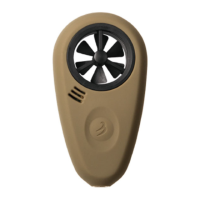

 To Next Page