EasyManua.ls Logo

WeatherGuide 1710 - User Manual

WeatherGuide 1710
3 pages
Print Icon
To Next Page IconTo Next Page
Loading...
WeatherGuide™ Wired Indoor/Outdoor Thermometer
Model 1710
Instruction Manual
Welcome to the Taylor® WeatherGuide™ System. Simple, reliable, accurate…it allows you to monitor indoor conditions
and read outdoor temperatures from indoors, creating an all-in-one weather display.
BATTERY INFORMATION
YourWeatherGuide™ is powered by 1 CR2025 lithium battery (included). There is a strip under the battery cover to
prevent battery drain in shipping. Please remove the strip before continuing with these instructions. (You may need to
remove the battery compartment cover to avoid breaking the strip). Also, some models have a static cling label on the lens
to prevent scratching. Please remove before use.
Replace the battery when the readings grow dim or irregular. To replace the battery:
1. Use one 3 volt CR2025 lithium battery.
2. Pull out the battery compartment on the side of the thermometer.
3. Remove the old battery from the compartment.
4. Place the new battery with the “+” sign up into the battery compartment.
5. Push the battery compartment cover back in.
NOTE: Please recycle or dispose of batteries per local regulations.
WARNING: Batteries may pose a choking hazard. As with all small items, do not let children handle batteries.
If swallowed, seek medical attention immediately.
PRECAUTION: Do not dispose of batteries in fire. Batteries may explode or leak. Remove the battery if the unit will not
be used for a long period of time.
DISPLAYING YOUR WEATHERGUIDE
Place the unit indoors in a well-ventilated location away from direct sunlight.
Table top display Pull out the Table Stand on the back of the unit.
Wall display use the keyhole on the back of the remote to hang on a wall using a nail or screw (not included).
TEMPERATURE READINGS
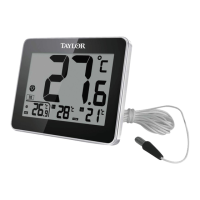
Your WeatherGuide™ displays current indoor and outdoor temperatures, as well as the maximum and minimum
temperatures recorded over the last 24 hours.
● Current temperature readings display in the center and the bottom left corner of the LCD screen
(next to the “ ” and “ ” icons).
● Maximum temperature readings display in the middle screen at the bottom of the LCD screen
(next to the ” icon).
Minimum temperature readings display in the right screen at the bottom of the LCD screen
(next to the “ ” icon).
Indoor temperature readings these are temperatures at the thermometer’s location.
Outdoor temperature readings these are temperatures measured by the attached sensor probe. Open a window and run
the cable through the opening so that the sensor probe is exposed to the outdoor temperature. Gently close the window to
avoid crimping or severing the cable.
Alternately, the probe may be used to measure temperatures of aquariums, swimming pools, hot tubs, etc. Simply allow
the end of the probe to hang where you wish to measure temperatures.
Temperature readings will update approximately every 10 seconds.
Question and Answer IconNeed help?

Do you have a question about the WeatherGuide 1710 and is the answer not in the manual?

Summary

Battery Information and Handling

Replacing the Battery

Instructions for replacing the CR2025 lithium battery, including removal and insertion.

Battery Safety Warnings

Important warnings regarding battery hazards like choking, fire, and disposal.

WeatherGuide Display and Temperature Readings

Unit Placement and Display Modes

Guidance on placing the unit and options for table top or wall display.

Understanding Temperature Displays

Explanation of current, maximum, and minimum indoor/outdoor temperature readings shown on the LCD.

Clock and Temperature Display Functions

Setting the Clock

Step-by-step instructions for setting the hour and minute on the thermometer's clock.

Switching Views

How to toggle between the clock and maximum/minimum temperature display modes.

Viewing Max;Min Temperature Records

Information on how to view stored high and low temperatures and their reset behavior.

Temperature Trend Indicator

Explanation of icons indicating if temperatures are rising, falling, or steady.

Alerts, Precautions, and Specifications

Ice Alert Function

Details on the ice alert feature and the snowflake icon warning.

General Precautions for Use

Important safety and handling guidelines for the thermometer unit.

Product Specifications

Key technical details including temperature ranges, resolution, and power source.

Warranty Information

Overview

The WeatherGuide™ Wired Indoor/Outdoor Thermometer, Model 1710, is a simple, reliable, and accurate device designed to monitor indoor conditions and display outdoor temperatures from indoors, providing an all-in-one weather display.

Function Description

The thermometer displays current indoor and outdoor temperatures, as well as the maximum and minimum temperatures recorded over the last 24 hours. It also features a clock display and a temperature trend indicator. An ice alert icon warns of possible icy conditions.

Important Technical Specifications

  • Indoor Temperature Range: 32°F to 122°F (0°C to 50°C)
  • Outdoor Temperature Range: -40°F to 158°F (-40°C to 70°C)
  • Temperature Resolution: 0.1 degree
  • Temperature Update Frequency: Approximately every 10 seconds
  • Power: 1 CR2025 lithium battery (included)
  • Clock: 12/24 hour format
  • Temperature Trend Indicators: Yes
  • Ice Alert Icon: Yes
  • Over/Under Range Messages: "HH.H" for over range, "LL.L" for under range

Usage Features

  • Battery Installation: The device is powered by one CR2025 lithium battery. A strip under the battery cover prevents drain during shipping and must be removed before use. The battery compartment is located on the side of the thermometer.
  • Placement: The unit should be placed indoors in a well-ventilated location, away from direct sunlight. It can be used as a tabletop display by pulling out the Table Stand on the back, or as a wall display using the keyhole on the back with a nail or screw (not included).
  • Temperature Display:
    • Current temperature readings are shown in the center and bottom left corner of the LCD screen (next to "in" and "out" icons).
    • Maximum temperature readings are displayed in the middle screen at the bottom (next to the "max" icon).
    • Minimum temperature readings are displayed in the right screen at the bottom (next to the "min" icon).
    • The "°C/°F" button on the back switches between Fahrenheit and Celsius.
    • The "IN/OUT" button on the back switches current indoor/outdoor temperature readings between the larger and smaller display windows.
    • If the current temperature exceeds the unit's range, "HH.H" will be displayed. If it's below range, "LL.L" will appear. For indoor temperatures below 32°F (0°C), a "Lo" warning will appear.
  • Outdoor Sensor Probe: The attached sensor probe measures outdoor temperatures. It can be run through a window opening, or used to measure temperatures in aquariums, swimming pools, or hot tubs.
  • Clock Setting:
    1. Press and hold the "SET" button for 3 seconds to enter Clock Setting Mode. The hour digits will flash.
    2. Use the "▲" button to change hours, then press "SET" to confirm.
    3. Use the "▲" button to change minutes, then press "SET" to confirm.
    4. The clock is set when digits stop flashing. The unit automatically exits Clock Setting Mode if no buttons are pressed within 30 seconds. Holding the "▲" button down advances digits quickly.
  • Viewing Clock/Max/Min Temperatures: Press and hold the "MODE" button on the back for 3 seconds to switch between clock and maximum/minimum temperature displays.
  • Maximum/Minimum Temperature Records: The unit stores high and low temperatures over a 24-hour period, starting from power-up. These records automatically reset at 12:00 AM based on the clock setting.
  • Temperature Trend Indicator: Arrow icons on the left side of the LCD screen indicate temperature trends:
    • Up arrow: Rising Temperatures (up more than 1.8°F/1°C in an hour).
    • No arrow: Steady readings (changed no more than 1.8°F/1°C in an hour).
    • Down arrow: Falling Temperatures (down more than 1.8°F/1°C in an hour).
  • Ice Alert: A snowflake icon appears in the center of the screen when the temperature is between 26.6°F and 33.8°F (-3°C and +1°C) to warn of icy conditions. The icon disappears outside this range.

Maintenance Features

  • Battery Replacement: Replace the battery when readings become dim or irregular. Use one 3-volt CR2025 lithium battery. Remove the old battery from the compartment and insert the new one with the "+" sign facing up.
  • Manual Max/Min Record Clear: To manually clear max/min records, remove the batteries for at least 1 minute, then reinstall them. The records will reset to current temperatures.
  • Cleaning: Dry immediately with a soft, lint-free cloth if liquid spills on it. Do not use abrasive or corrosive materials.
  • Precautions:
    • Intended for indoor use only; not sealed against moisture.
    • Do not immerse in water.
    • Avoid excessive force, shock, dust, temperature, or humidity.
    • Do not tamper with internal components, as this invalidates the warranty.
    • Do not dispose of batteries in fire; remove batteries if the unit will not be used for a long period.
    • Do not place the unit or probe into ovens, grills, freezers, or microwave ovens.
    • Always read the instruction manual before operating.

Warranty: The product comes with a One Year Limited Warranty against defects in materials or workmanship (excluding batteries) from the date of original purchase. For warranty service, do not return to the retailer; pack the item carefully and return it prepaid with the store receipt and a note explaining the reason for return to Taylor Precision Products, Inc. (2220 Entrada Del Sol, Suite A, Las Cruces, New Mexico 88001).

WeatherGuide 1710 Specifications

General IconGeneral
BrandWeatherGuide
Model1710
CategoryThermometer
LanguageEnglish