11.1 Barometer Mode - Unit Selection and Barometer Adjustment
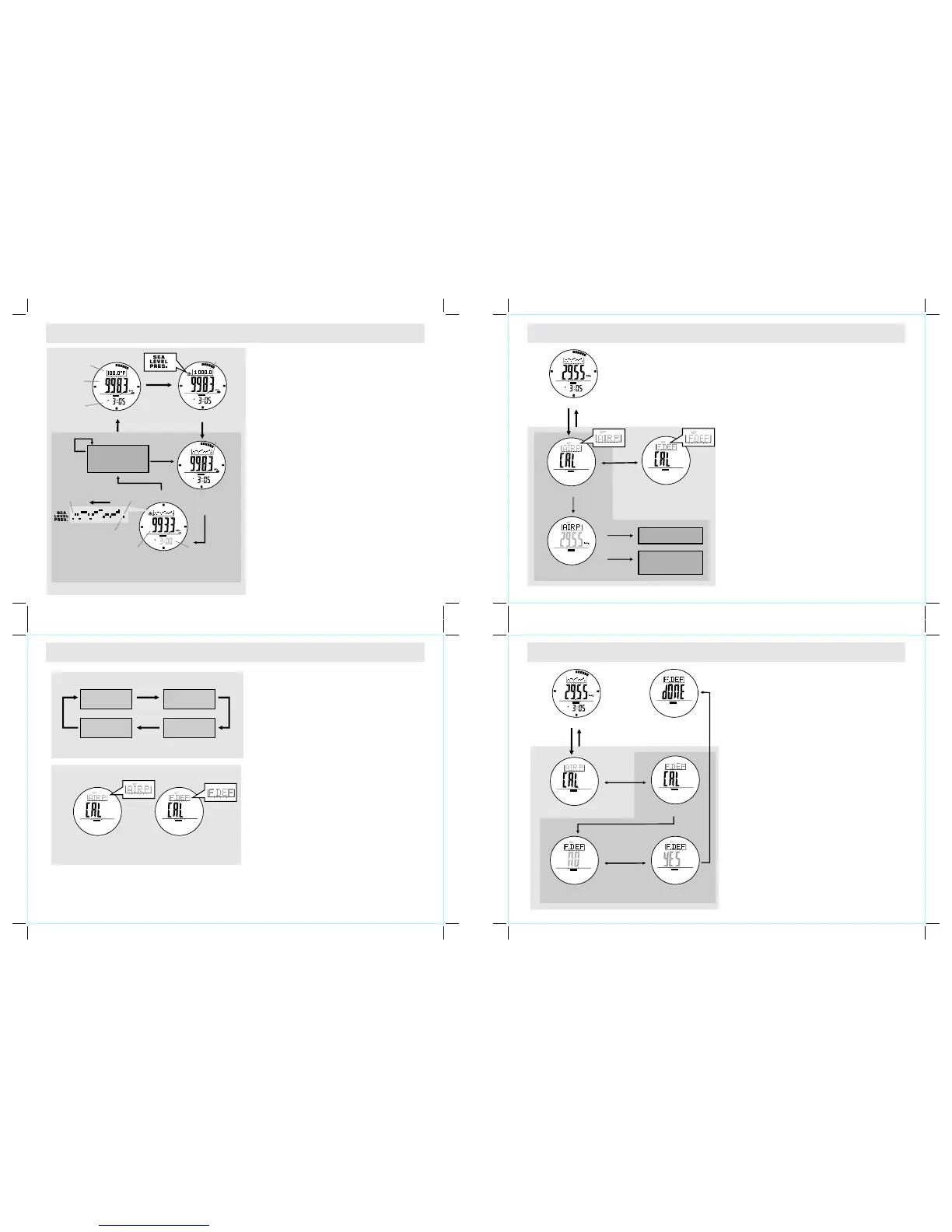
How to Switch between Units
! The Watch can display pressure in mb/hPa or
inHg and temperature in degree Celsius ( C) or
degree Fahrenheit ( F).
! To switch among different units, hold the [S/S]
button to change the units following the adjacent
unit selection sequence.
Why the Barometer Needs to be Adjusted
! The Watch has been calibrated for you in the
factory. For normal use, you do not need to
calibrate the Barometer.
! For serious users, the watch can be adjusted or
calibrated.
°
°
Barometer Adjustment
! Th ere are 2 kinds of Barome ter adj ustment
methods: Absolute Pressure and Factory Default
Adjustment.
! Absolute Pressure: Input the known atmospheric
pressure into the Watch directly.
! Factory Default: Restore the Watch to the factory
default setting.
! For in-depth information for each adjustment
method, please read the coming sections for
details.
Factory De fault Display
Absolute P ressure Display
Adjustment Displays
Unit Selec tion Sequence
°C (Celsiu s)
inHg
°C (Celsiu s)
mb/hPa
°F(Fahre nheit)
mb/hPa
°F (Fahren heit)
inHg
hold
[S/S]
hold
[S/S]
hold
[S/S]
hold
[S/S]
hold
[S/S]
11.2 Barometer Mode - Absolute Pressure Adjustment
Before Calibrating the Barometer
! You have to know the absolute pressure of your
current position because that pressure value will
be input into the Watch during the adjustment.
IMPORTANT: Inputting an incorrect pressure during
th e ca lib r at i on p roc e dur e re s ul t s a m ist a ken
pressure reading in future.
How to Adjust the Barometer Using Absolute
Pressure Adjustment
! You can adjust the current pressure reading to
an absolute pressure value.
To adjust the pressure using
, pre s s the [ S / S] butt o n on the
Display, and the pressure
reading will appear.
! When the pressure reading appears, press the
[S/S] or [L/R] button to increase / decrease the
number. ( Hold the button to change the number
at a higher speed).
! If the setting is completed, hold the [M] button to
confirm setting and exit the adjustment display.
! To select the Adjustment Display, hold the [M]
button in the Barometer Mode. Then press the
[M] bu t to n t o selec t b et we en the A b so lu t e
Pr es su re Ad ju st me n t a nd Fa ct or y D e fa ul t
Adjustment.
! Absolute Pressure
Adju s t ment
Absolute Pressure
BARO
[M]
Factory De fault Display
Absolute P ressure Display
Absolute P ressure Display
Barom ete r Mode
hold
[M]
hold
[M]
BAROBARO
BARO
BARO
[S/S]
[S/S]/[L /R]
hold
[S/S]/[L /R]
Increase ( decrease)
the number
Increase ( decrease)
the number
at a higher sp eed
11.3 Barometer Mode - Factory Default Adjustment
How to Adjust the Barom eter Using F actory
Default Adjustment
You can adjust the pressure reading calculation
back to the factory default value.
To adjust the pressure using the factory default
adjustment, press the [S/S] button on the Factory
Def ault Disp lay, and t he indica t or "NO" will
appear.
! When the indicator "NO" appears, press the [S/S]
or [L/R] button to select between "YES" (reset
the pressure to the factory default) or "NO"
(abort the resetting).
! To exit Adjustment Display, hold the [M] button
for 2 seconds, and then the Watch will go back
to the Barometer Mode. If the "YES" Display is
selected when exiting the Adjustment Display, the
"DONE" Display will appear for 2 seconds prior
to the normal operation.
!
! To select the Adjustment Display, hold the [M]
button in the Barometer Mode. Then press the
[M] bu t to n t o selec t b et we en the A b so lu te
Pr es su re Ad ju st me n t a nd Fa ct or y D e fa ul t
Adjustment.
!
[M]
2 seconds
Factory De fault Display
"DONE" Dis play
Factory Default Adjustment
"YES" Disp lay"NO" Displ ay
Absolute P ressure Display
Baromete r Mode
hold
[M]
hold
[M]
hold
[M]
[S/S] / [L/R ]
BARO
SET
BARO
SET
BARO
BARO
BARO
BARO
[S/S]
BARO
BAROBARO
11.0 Barometer Mode - Temperature and History Display
Functional Display
! The Wa tch in cludes three Barom eter f unction al
di splay s: Tem perature, Sea Level Pre ssure and
History Displays.
! One of the three functional displays will appear in
the top row of the display. The current (history)
pressure and the current (history) time are shown in
the middl e row and bottom row of the display
respectively.
Temperature Display
! O n t h e Te m p er a t u r e D i sp l a y , t h e c u rr e n t
temperature in degree Celsius ( C ) o r deg r e e
Fahrenheit ( F) is shown in the top row of the
display.
IMPORTANT: If you want to have an accurate reading
of air temperature, you must take off the watch from
the wrist that prevents body temperature effect on
your watch.
Sea Level Pressure Display
! On the Sea Level Pressure Display, the current sea
level pressure is shown in the top row of the display.
Sea Level Pressure History Display
! The Watch records the sea level pressure readings
automatically on the hour, i.e 1:00, 2:00, 3:00 and
etc. These records will be plotted into a pressure
record graph.
! In Sea Level History Display, the pressure record
graph is shown in the top row of the display.
! To review the pressure records of the last 23 hours,
press the [L/R] button to move the cursor to the left
cyclically, and the corresponding pressure record
and its recording time (flashing) will appear on the
display according the adjacent diagram.
°
°
BARO
Barometer Mo de
current
temperat ure
Sea level
pressure
current
pressure
current
time
[L/R]
[L/R]
Current Pr essure
Display
(Current Time)
Tempe rature Display Sea Level Pr essure Display
[S/S]
[S/S]
[S/S]
BARO
BARO
Sea Level Pressure
History Display
(1st Record at the hour)
cursor moving
direction
flashing cursor
(1 st record at the hour)
respective sea level
pressure
flashing
BARO
[L/R]
[L/R]
Sea Level Pressure
History Display
(-2 to -23 hour)
Sea Level Pressure
History Review
- 23
hour
current
time
Current
pressure



 To Next Page
 Loading...