Personal user account registration
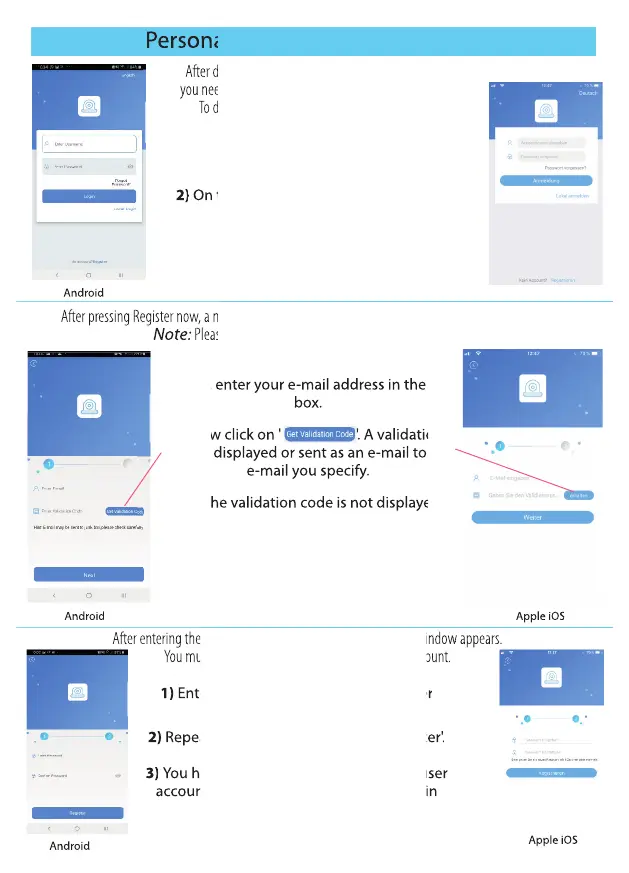
1) Launch the ADCloud app
2) On the login screen at the bottom, click
'Register now'.
1) First, enter your e-mail address in the top
box.
2) Now click on ' '. A validation
code is displayed or sent as an e-mail to the
e-mail you specify.
3) If the validation code is not displayed
automatically, enter the validation code
sent to you (by E-Mail) in the validation eld
and press ‘Next’.
Android
Android
Android
Apple iOS
Apple iOS
Apple iOS
1) Enter your new password for your user
account.
2) Repeat your password and press 'Register'.
3) You have now successfully set up your user
account and will be redirected to the login
screen.
After downloading the app on your phone or tablet,
you need to set up a user account in the ADCloud app.
To do this, you need to follow the steps below:
After pressing Register now, a new window opens. You now need to register with your email address.
Note: Please note that emails may end up in your spam folder.
After entering the validation code and pressing ‘Next’, a new window appears.
You must now set up the password for your user account.
Enter your new password for your user
Repeat your password and press 'Register'.
You have now successfully set up your user
account and will be redirected to the login
After entering the validation code and pressing ‘Next’, a new window appears.
You must now set up the password for your user account.
4
Personal user account registration
On the login screen at the bottom, click
After downloading the app on your phone or tablet,
you need to set up a user account in the ADCloud app.
To do this, you need to follow the steps below:
After pressing Register now, a new window opens. You now need to register with your email address.
After pressing Register now, a new window opens. You now need to register with your email address.
Please note that emails may end up in your spam folder.
Enter your new password for your user
Repeat your password and press 'Register'.
You have now successfully set up your user
account and will be redirected to the login
After entering the validation code and pressing ‘Next’, a new window appears.
After entering the validation code and pressing ‘Next’, a new window appears.
After entering the validation code and pressing ‘Next’, a new window appears.
After entering the validation code and pressing ‘Next’, a new window appears.
You must now set up the password for your user account.
First, enter your e-mail address in the top
First, enter your e-mail address in the top
Now click on ' '. A validation
Now click on ' '. A validation
code is displayed or sent as an e-mail to the
code is displayed or sent as an e-mail to the
If the validation code is not displayed
If the validation code is not displayed


 To Next Page
 Loading...