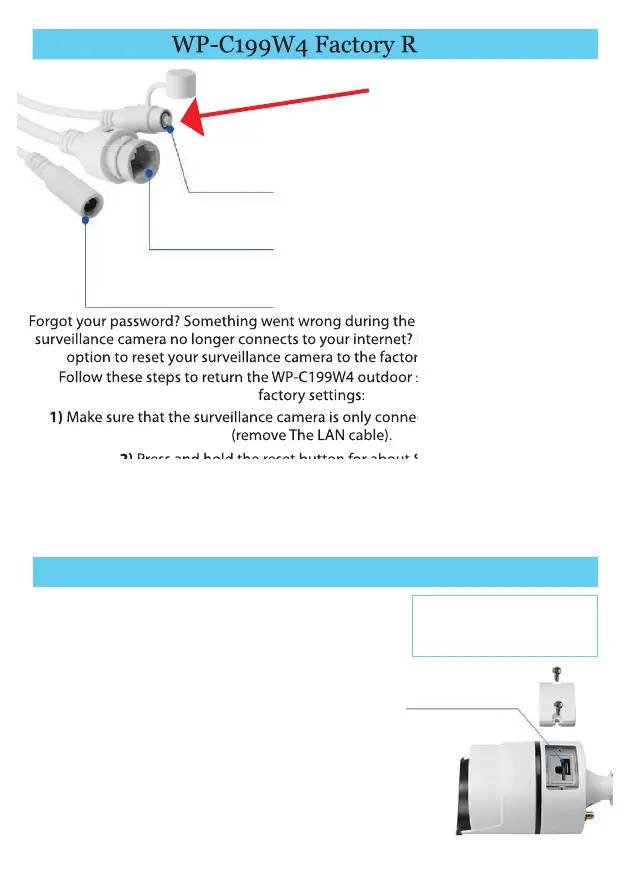
WP-C199W4 Factory Reset
12
Forgot your password? Something went wrong during the initial commissioning? The
surveillance camera no longer connects to your internet? No problem! You have the
option to reset your surveillance camera to the factory setting at any time.
Follow these steps to return the WP-C199W4 outdoor surveillance camera to
factory settings:
1) Make sure that the surveillance camera is only connected to the power cable
(remove The LAN cable).
2) Press and hold the reset button for about 8-10 seconds.
3) When you hold the surveillance camera to your ear, you will hear two short, dull
'click' sounds.
4) The surveillance camera, as well as all settings and passwords are now back to the
factory settings.
Forgot your password? Something went wrong during the initial commissioning? The
surveillance camera no longer connects to your internet? No problem! You have the
option to reset your surveillance camera to the factory setting at any time.
Follow these steps to return the WP-C199W4 outdoor surveillance camera to
Make sure that the surveillance camera is only connected to the power cable
Press and hold the reset button for about 8-10 seconds.
Reset Button
Network / LAN connection RJ45
Power Connector Plug
To expand the memory of the surveillance camera, you
can install a Micro SD card up to 64GB.
1) Unscrew the SD card cover like
shown in the illustration.
2) Insert the SD card into the SD card slot as shown.
3) In the device settings under 'Device Information’ you
will nd the SD card information. You will also be able
to format your SD-card here.
4) In the live video of the surveillance camera under
'Playback', you have direct access to all
Memory data of your SD card without having to
remove it.
SD Card Installation (WP-C199W4)
SD Card
Note: If the surveillance camera
does not recognize the SD card at
rst, you must rst format it using
your computer.


 To Next Page
 Loading...