In case of damage or malfunction, do not return your toy to a store. Call My Funky Planet Customer Service: 1-800-270-5718
1. HOW TO CONNECT THE LEGS
- First plug in the leg to the drone
- Then use the screwdriver to tight up the screw
to the body of the drone. (There two big screw
required for each leg)
2. HOW TO CONNECT THE GUARD
- First plug in the guard to the drone
- Then use the screwdriver to tight up the screw
to the body of the drone. (There one small screw
required for each guard)
3. HOW TO CONNECT BATTERY AND CAMERA
- Open the battery door
- Then connect the battery to the drone
- Connect Camera cable to Video slot in drone
4. HOW TO TURN ON/OFF THE DRONE
- There is ON/OFF button at the bottom of the drone.
ENG
HOW TO CHARGE YOUR XDRONE
BATTERY INSTALLATION
THIS PRODUCT CONTAINS A LITHIUM-POLYMER BATTERY 3.7V:
LiPo batteries have a severe risk of fire and injury if they are improperly handled or misused.
They may explode, overheat or ignite. Read all following precautions and instructions
regarding the care and use of LiPo batteries. The enclosed LiPo battery is only to be used with
the vehicle and charger included with this product. · Keep away from flammable materials ·
Do not expose to direct sunlight · Do not place in fires or leave in hot places · Do not drop or
make subject to strong impact · Keep dry and away from water.
Lipo Battery Disposal: LiPo batteries must be recycled or disposed of properly. They should
not be disposed of with other household waste. Check your local laws and regulations for
correct recycling and/or battery disposal.
Plug the USB charging cable into a USB port, then connect the charger plug to
the battery. When battery is charging, the LED in USB cable is red. Whe
charging is complete, the LED turns off.
Unplug the charger plug from battery and disconnect the USB charging
cable. Let the batteries rest for 15 minutes afterdone charging and after
use (before recharging).
STEP 1
STEP 2
1. Locate the battery slot on
the bottom of the XDrone.
2. Follow the arrow on the frame
to insert battery facing up.
3. Plug battery to XDrone only
when ready to fly.
INSTRUCTION MANUAL · · 14+
1. Lift rod / press: acceleration
2. The direction of the joystick / press: reset
3. The indicator light
4. The antenna
5. Camera button (pictures-video)
6. Rolling
7. Power switch
8. Headless / light control
9. Before and after fine-tuning
10. Turned to fine-tuning
11. Left and right side of the fine-tuning
4
7
3
1 2
5 6
10
11
8 9
NAME OF REMOTE CONTROL PARTS
REMOTE CONTROL BATTERY INSTALLATION
Battery installation method:
open the battery cover on the
reverse of the remote control,
and in accordance with the
electrode instructions in the
battery box, correctly put the
four 1.5V AAA
batteries.(batteries need to be
purchased).
Note:
1. Look for the positive and negative battery and positive and negative electrode
of battery box when putting the batteries in, and don’t put them wrong.
2. Do not mix old and new batteries.
3. Do not mix batteries of different types.
Turn right
Turn left
When the left joystick (throttle)
is pushed upward, the main
blade rotating speed increases,
and aircraft rises.
When the left joystick (throttle)
is pushed downward, the main
blade rotating speed slows
down, and aircraft descends.
Rise
Decline
When the left joystick (steering
rudder) is pushed left, aircraft
head turns left. When pushed
right, aircraft head turns right.
When the right joystick (rudder)
is pushed upward, aircraft head
moves forward.
When the right joystick (rudder)
is pushed downward, aircraft
head recedes.
When the right joystick (rudder)
is pushed right, aircraft body
flies right.
When the right joystick (rudder) is
pushed left, aircraft body flies left.
Forward
Left to fly Fly right
Back off
When the aircraft flies left,
toggle right flying fine-tuning
button, until the aircraft doesn’t
fly sideways.
When the aircraft flies right,
toggle left flying fine-tuning
button, until the aircraft doesn’t
fly sideways.
When the aircraft hovers,
body moves backward toggle
forward fine-tuning button,
until the aircraft will not move
backward.
When the aircraft hovers,
body moves forward toggle
backward fine-tuning button,
until the aircraft will not move
backward.
TRIMMING
distance
3 meters
distance
3 meters
distance
2.5 meters
distance
2 meters
distance
3 meters
Note:
When the aircraft is 30cm above the ground, aircraft will be affected by the blade
vortex and becomes unstable, and this is called "ground effect reaction". When the
lower the aircraft weight is, the greater the influence of ground effect reaction is.
1
OPERATION METHOD

 Need help?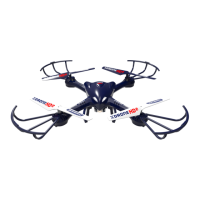

 To Next Page
 General