EasyManua.ls Logo

Wedge Clamp Systems Inc. 17350 - User Manual

Wedge Clamp Systems Inc. 17350
7 pages
Print Icon
To Next Page IconTo Next Page
Loading...
POT PRESS KIT
OPERATING INSTRUCTIONS
PART #17350
Page
Introduction ................................................................................................................................. 1
Installing Pots .............................................................................................................................. 2
Removing Old Anchor Pots.......................................................................................................... 5
Notes ........................................................................................................................................... 6
Question and Answer IconNeed help?

Do you have a question about the Wedge Clamp Systems Inc. 17350 and is the answer not in the manual?

Summary

Introduction

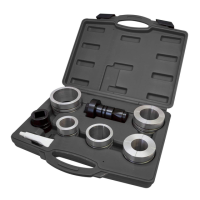
Pot Press Kit Components

Lists and illustrates the tools included in the Pot Press Kit for operation and maintenance.

Installing Pots

Position Press Spacer

Place the Press Spacer over the pot, ensuring the chain is not twisted during installation.

Adjust Press Handle Height

Select a link and position for a 60-degree handle angle relative to the floor.

Set Pot Plug with Hammer

Tap the Press Handle with a hammer to set the pot plug, applying approximately 5 tons of force.

Removing Old Anchor Pots

Knock Out Plug

Use the Pot Remover tool to knock out the plug located at the bottom of the pot.

Insert Pot Remover and Handle

Insert the Pot Remover and Press Handle into the pot for the removal process.

Release Pot with Hammer

Place the Press Spacer and tap the Press Handle with a hammer to release the pot.

Wedge Clamp Systems Inc. 17350 Specifications

General IconGeneral
BrandWedge Clamp Systems Inc.
Model17350
CategoryTools
LanguageEnglish