8
SERVICE AND ADJUSTMENTS
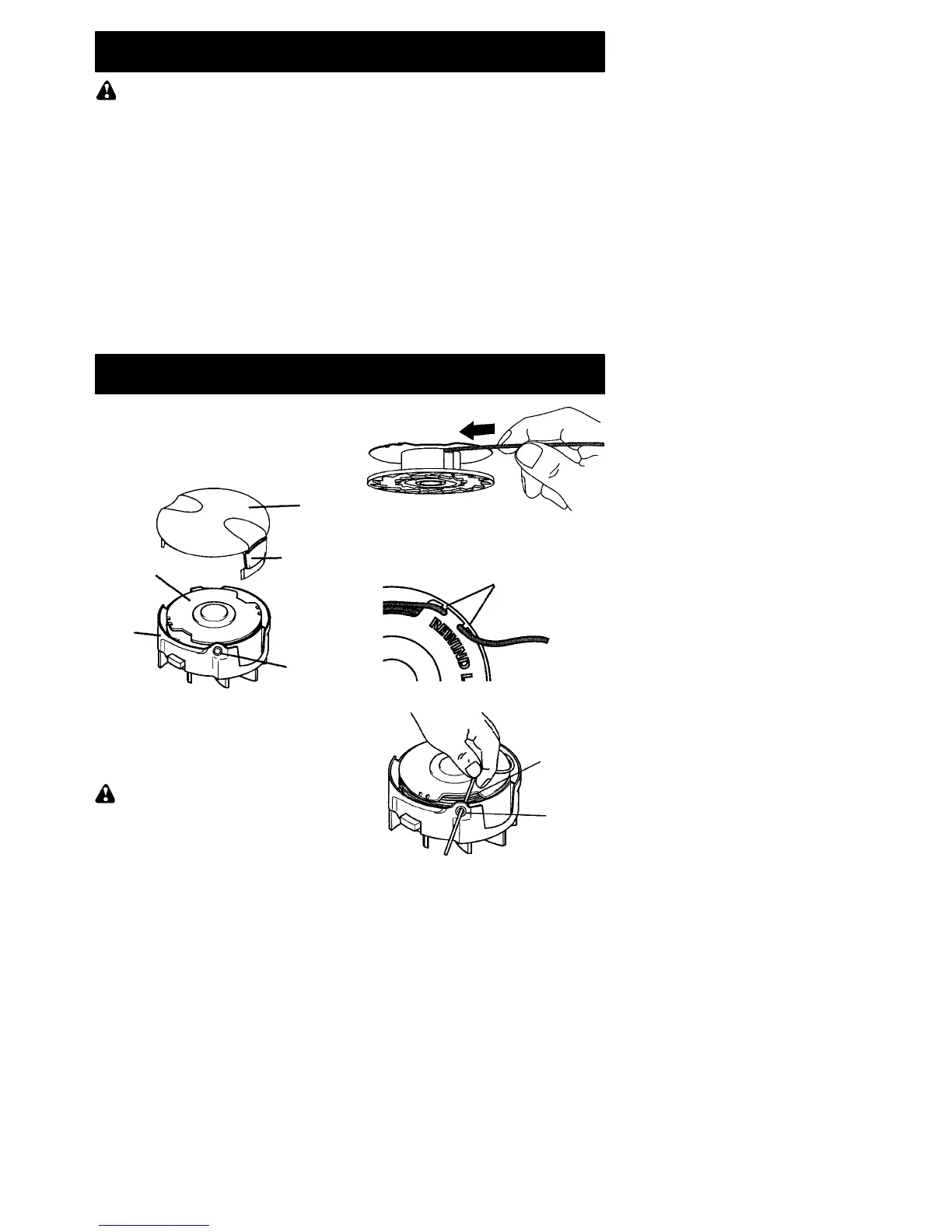
REPLACING THE LINE
1. Disconnect the unit from the power
source.
2. Press and hold in the two cap release
latches.
3. Pull cap away from the hub.
Cap
Cap
release
latch
Spool
Hub
Eyelet
4. Remove old spool.
5. Clean entire surface of hub and spool.
6. Replace with a pre--wound spool or cut a
length of 26 feet (8 meters) of 0.065″ (1.65
mm) diameter WEED EATER brand line.
Use of heavier lines could overload and
damage unit.
WARNING: Never us e wire, rope,
string, etc., which can break offand become a
dangerous missile.
7. Insert end of line about 1/2 inch (1 cm)
into small hole on the inside of the spool.
8. Wind the line evenly and tightly onto the
spool. Wind in the direction of the arrow
found on the spool.
9. Push the line into the notch, leaving3to 5
inches (7 -- 12 cm) unwound.
Notches
10. Place spool into hub with cut out area of
spool in line with eyelet (see illustration).
Cut out
area of spool
Eyelet
11. Remove line from notch and feed line
through eyelet.
12. Reinstall the spool cap.
MAINTENANCE
WARNING: Disconnect unit from the
power source before performing mainte-
nance.
GENERAL RECOM MENDATIONS
Thewarranty onthis unit does not cover items
that have been subjected to operator abuse
or negligence. To receive full value from the
warranty, the operator must maintain unit as
instructed in this manual. Various adjust-
ments will need to be made periodically to
properly maintain your unit.
BEFORE EACH USE
CHECK FOR LOOSE
FASTENERS AND PARTS
• Housing Screws
• Locking Sleeve Assembly
• Assist Handle
• Debris Shield
• Edge Guide
CHECK FOR DAMAGED OR
WORN PARTS
Contact an authorized service dealer for re-
placement of damaged or worn parts.
• Trigger Switch -- Ensure switch functions
properly by pressing and r eleasing the trig-
ger switch. Make sure motor stops.
• Debris Shield -- Discontinue use of unit if
debris shield is damaged.
AFTER EACH USE
INSPECT AND CLEAN UNIT AND LA-
BELS
• After each use, inspect complete unit for
loose or damaged parts. Clean the unit us-
ing a damp cloth with a mild detergent.
• Wipe off unit with a clean dry cloth.



 To Next Page