11
17
21
15
12
15
66
9
21
4
Bracket
17
16
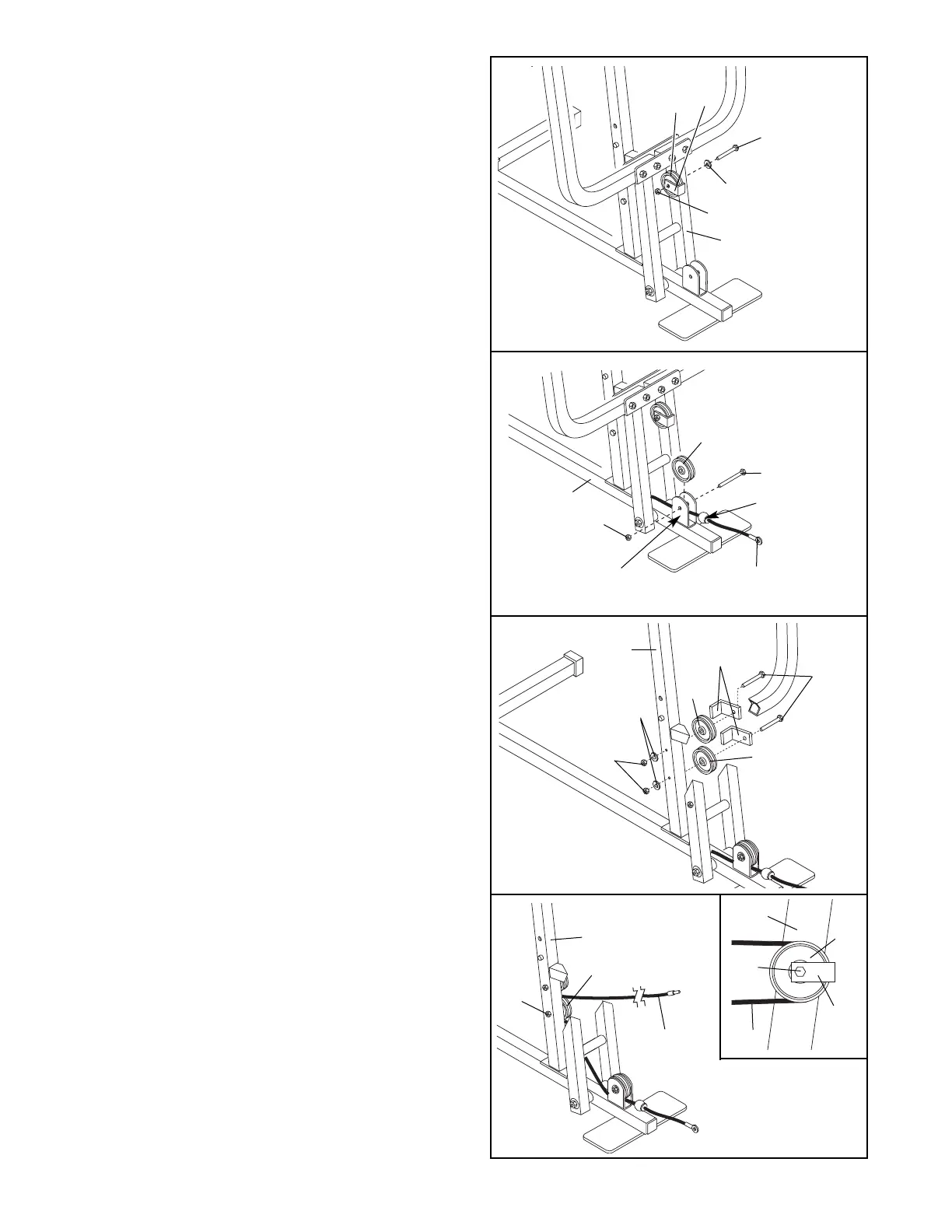
17. Using a 3/8” x 3 1/2” Bolt (16), a 3/8” Washer (9),
and a 3/8” Nylon Locknut (21), secure a 3 1/2”
Pulley (15) and a Cable Trap (66) to the upper
hole in the Press Frame (17). Make sure that the
Cable Trap and the Pulley are oriented as
shown.
18. Locate the Short Cable (23). Lay the Short
Cable inside the bracket on the Base (4). Attach a
3 1/2” Pulley (15) inside the bracket with a 3/8” x
2” Bolt (12) and a 3/8” Nylon Locknut (21). Be
sure that the ball on the Cable is on the indi-
cated side of the bracket.
23
Ball
18
19. Attach two 3 1/2” Pulleys (15) and two Cable
Traps (66) to the Front Upright (42) with two 3/8”
x 3 3/4” Bolts (68), two 3/8” Washers (9), and two
3/8” Nylon Locknuts (21). Be sure that all parts
are oriented as shown. Do not tighten the
Nylon Locknuts yet.
20. Route the Short Cable (23) around the 3 1/2”
Pulley (15) attached to the lower hole in the Front
Upright (42). See the inset drawing. Be sure
that the Cable Trap (66) is turned to hold the
Cable in place and that the Cable is routed
around the Pulley as shown. Tighten the 3/8”
Nylon Locknut (21) and the 3/8” x 3 3/4” Bolt (68).
20
23
21
42
15
68
23
Inset shows view
from other side
42
66
15
19
21
15
15
68
9
42
66




 To Next Page