ACTIVATING THE ALARM
1. Once the alarm time is set, press “AL1/VOL-” button (7) once for alarm with buzzer (Indicator A will be
on) and twice for alarm with radio (Indicator B will be on).
2. Digits will stop flashing after a short while.
3. Press “AL1/VOL-” button (7) until all indicators off to turn off alarm.
WHEN THE ALARM SOUNDS
1. When the alarm sounds, press “ AL.OFF” button (1) to turn off alarm or press “SNOOZE NAP/SLEEP”
button (2) for snooze.
2. Once in snooze, alarm will sound again after 9 minutes.
DISPLAY BRIGHTNESS
When the radio is off and the current time showing, press “DIMMER” button (4) to change the brightness
of the display between high and low.
(Note: Do not change the display brightness while setting the clock radio and when the alarm is on.)
TIME PROJECTION
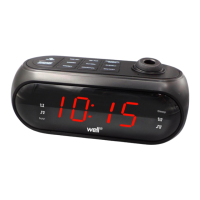
Press “PROJECTION ON/OFF” button (9) to turn time projection on and off. It is most visible on a flat white
surface. Press “180
FLIP” button (6) to rotate time projection by 180
. Tilt and adjust “time projection /
focus dial” (12) as needed.
RADIO OPERATIONS
General Operations
1. Press “ AL.OFF” button (1) to turn radio on and off. The radio station frequency will appear on the
display.
2. Press “HOUR/TUN-” button (8) or “MIN/TUN+” button (11) to change radio frequency. Or, press and
hold down “HOUR/TUN-” button (8) or “MIN/TUN+” button (11)for approximately 3 seconds to auto
scan for the next available station.
3. Press “AL1/VOL-” button (7) or “AL2/VOL+” button (10) to adjust volume level.
4. Radio will show the time in a few seconds after changing frequency. Press “HOUR/TUN-” button (8) or
“MIN/TUN+” button (11) to view radio frequency.
Pre-set Station Memory
1. The radio can store up to 10 FM stations.
1. To store a station in memory, tune to the desired radio station. Press and hold down “PRESET” button
(5) and a number starting with “P” on the display will flash. This “P” number represent one of the ten
memory stations. Press “HOUR/TUN-” button (8) or “MIN/TUN+” button (11) to change the station
number. Press “PRESET” button (5) to confirm.
2. To recall a pre-set station, turn the radio on. Press “PRESET” button (5) repeatedly until station number
is found. The station frequency will be display momentarily.


 To Next Page